


Operating from the unit
You can perform cooling/warming operations by using the following buttons on the unit.
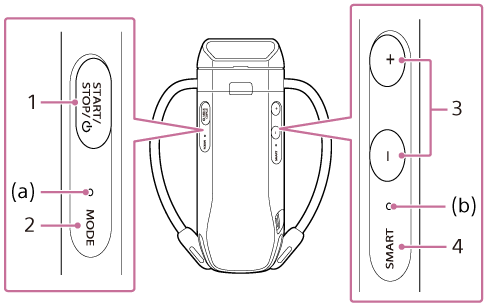
-
START/STOP/
 (power) button
Starts/stops operation. Pressing and holding the button for about 2 seconds turns the unit on/off.
-
MODE button
Switches between COOL (cooling operation) and WARM (warming operation).
- When the mode is changed, the mode LED (a) will light up for about 5 seconds in the color shown below corresponding to the mode.
- SMART COOL ⇔ WARM mode*: green
- SMART COOL / MANUAL COOL mode: blue
- SMART WARM / MANUAL WARM mode: orange
* REON POCKET TAG (sold separately or included with the RNPK-P1T/RNPK-P1PT) is required to use this function. For details on how to use REON POCKET TAG, refer to the following Help Guide. (The models sold may differ depending on the country or region.)
https://rd1.sony.net/help/reonpocket/rnpt1/h_zz/ - After switching modes, the mode LED (a) will be in the following state depending on the operating condition.
- Operating: Remains lit in a color corresponding to the current mode.
- Stopped: Flashes continuously in a color corresponding to the current mode.
- When the mode is changed, the mode LED (a) will light up for about 5 seconds in the color shown below corresponding to the mode.
-
+ (plus) button / − (minus) button
Changes the cooling/warming setting.
-
When the setting is changed, the status LED (b) will flash. The color of the LED indicates the current mode, and the number of flashes indicates the current setting. The table below shows the flashing color and number of flashes for each mode.
Mode Flashing color Number of flashes 1 time 2 times 3 times 4 times 5 times MANUAL COOL mode Blue Level 1 (low) Level 2 Level 3 Level 4 Level 5 (strong) MANUAL WARM mode Orange Level 1 (low) Level 2 Level 3 Level 4 (strong) ― SMART COOL mode Green Low Cool Slightly Low Cool Medium (Recommended) Slightly High Cool High Cool SMART WARM mode Green Low Warm Slightly Low Warm Medium (Recommended) Slightly High Warm High Warm
-
-
SMART button
Switches between the SMART COOL / SMART WARM mode and the MANUAL COOL / MANUAL WARM mode.
- While the unit is operating, the status LED (b) indicates the current mode.
- SMART COOL / SMART WARM mode: lights up in green
- MANUAL COOL / MANUAL WARM mode: off
- While the unit is operating, the status LED (b) indicates the current mode.
Hint
- If the unit is linked to REON POCKET TAG, the operating mode will change in the following order each time you press the MODE button.
SMART COOL ⇔ WARM mode → COOL mode → WARM mode → SMART COOL ⇔ WARM mode... - While the unit is switching between modes, the mode LED (a) will flash for about 10 seconds in a color corresponding to the new mode.
