Wireless Speaker
ULT TOWER MAX
Help Guide
Table of Contents
Top
What you can do with the speaker
Using the speaker
Using the “Sound Connect” app
Getting started
Parts and controls
Carrying or placing the speaker
Power source
Connecting the speaker to an AC outlet
Turning the power on
Turning the power off
Using the BLUETOOTH standby (auto power on) function
Charging a USB device such as a smartphone or iPhone
Auto Standby (power saving) function
Lighting function
Turning on or off the speaker’s light (Lighting function)
Making connections
BLUETOOTH device
How to make wireless connections to BLUETOOTH devices
Connecting to BLUETOOTH devices easily with the “Sound Connect” app via a BLUETOOTH connection
Connecting with an Android™ smartphone or iPhone via a BLUETOOTH connection
Connecting with a computer via a BLUETOOTH connection (Windows
®
)
Connecting with a computer via a BLUETOOTH connection (Mac)
Multipoint connection
Connecting the speaker concurrently with 2 BLUETOOTH devices (multipoint connection)
DJ device
Connecting with a DJ device (LINE 1)
Connecting with a DJ device in a balanced connection (LINE 2)
Connecting a USB device (USB-A)
Connecting a computer or a smartphone (USB-C)
Listening to music
BLUETOOTH device
Listening to music of a device via a BLUETOOTH connection
Terminating the BLUETOOTH connection (After use)
Activating or deactivating the BLUETOOTH function
DJ device
Listening to music from a DJ device (LINE 1)
Listening to music from a DJ device in a balanced connection (LINE 2)
Listening to music from a USB device (USB-A)
Listening to music from a computer or a smartphone (USB-C)
Enjoying switching the sound effects
Listening to music wirelessly with 2 speakers (Stereo Pair function)
Enjoying wireless playback using multiple speakers (Party Chain function)
Additional features
Using an external microphone
Information
About the indicators
Precautions
Supported codecs
How to keep the software up-to-date (for comfortable use of the speaker)
Notes on water resistant feature
How to care for the speaker
About the BLUETOOTH wireless technology
Licenses
Trademarks
Troubleshooting
Troubleshooting
Restarting the speaker
Initializing the speaker
Specifications
Specifications
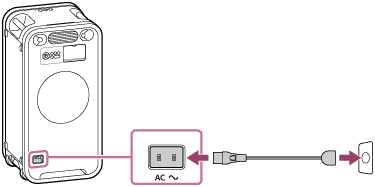
Connecting the speaker to an AC outlet
Firmly plug one end of the supplied AC power cord (mains lead) to the AC input jack on the rear side of the speaker. Then, plug the other end to an AC outlet.
Print This Page
Previous
Next
TP1002380764