


The zoom features available with this product
The camera is equipped with a prime lens.
Zooming is not possible when shooting still images, but you can shoot with an angle of view equivalent to that of a 50 mm or 70 mm lens by cropping the angle of view. For details, refer to “ Step Crop Sht. Settings .”
When recording movies, you can perform zooming with clear image zoom or digital zoom. The icon displayed on the screen changes, according to the selected zoom feature.
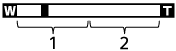
-
Clear Image Zoom (
 ):
):Zoom images using an image process with less deterioration. When you set [Zoom] to [Clear Image Zoom] or [Digital Zoom], you can use this zoom function.
-
Digital Zoom (
 ):
):You can magnify images using an image process. When you set [Zoom] to [Digital Zoom], you can use this zoom function.
Note
- The Clear Image Zoom and Digital Zoom functions are not available when shooting in the following situations:
- In the still image shooting mode
- [Rec Frame Rate] is set to [120p]/[100p].
- During slow-motion/quick-motion shooting with the frame rate set to [120fps]/[100fps]
- When you use a zoom function, [
 Metering Mode] is locked to [Multi].
TP1001776410