


Step Crop Sht. Settings

This camera is equipped with a full-frame 35 mm prime lens, but step crop shooting allows you to shoot with an angle of view equivalent to a focal length of 50 mm or 70 mm.
-
MENU→
 (Shooting) → [Image Quality/Rec] → [Step Crop Sht. Settings] → desired setting.
Menu item details
- Step Crop Sht. Settings:
- Sets the angle of view for the crop shooting. (35mm(Off)/50mm/70mm)
- Step Crop Shoot. Limit:
- Limits the angle of view used for the crop shooting. Uncheck the items you do not want to use. (35mm(Off)/50mm/70mm)
The settings are effective when you change the angle of view using the touch function icon, the Fn menu, or a key or dial to which [Switch Step Crop Shoot.] has been assigned.
About the angle of view
Depending on the [Step Crop Sht. Settings] setting, the angle of view changes as follows.
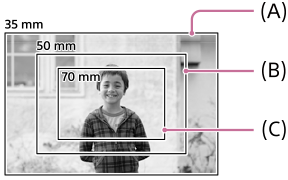
(A) Angle of view when set to [35mm(Off)]
(B) Angle of view when set to [50mm]
(C) Angle of view when set to [70mm]
- When shooting in the step crop mode, the image is displayed with the cropped angle of view on the shooting standby screen.
- Images shot in the JPEG/HEIF format are recorded with the cropped angle of view.
- For images shot in the RAW format using step crop shooting, cropping information is recorded in the image metadata, and the image itself is recorded with a full-frame angle of view as shown above (A). When you play back the image on the camera, it is played back with the cropped angle of view.
Hint
- If you assign [Switch Step Crop Shoot.] to a desired key or a dial using [
 Custom Key/Dial Set.], you can switch the angle of view to be cropped by pressing the assigned key or rotating the assigned dial. In the default settings, [Switch Step Crop Shoot.] is assigned to the C1 (Custom 1) button for the still image shooting mode.
 - Images shot in the RAW format contain metadata about the cropping range and position along with full-frame image data. When editing on a computer, the cropping position and area set during shooting can be adjusted within the full image area.
Note
- When performing step crop shooting, [JPEG Image Size]/[HEIF Image Size] is limited as follows.
- [50mm]: M size or S size
- [70mm]: S size
- When RAW shooting in the lossless compressed format, the image size is locked to the L size.
TP1001849862