


Using the mode dial
Use the mode dial to select a shooting mode according to the subject and purpose of shooting.
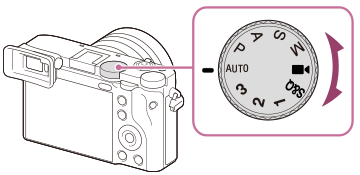
Shooting mode details
The modes on the mode dial are divided into still image shooting modes, movie recording modes, and registration recall modes.
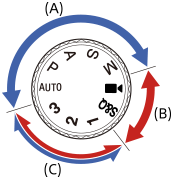
(A) Still image shooting modes
(B) Movie recording modes
(C) Registration recall modes
Hint
- The menu items displayed vary depending on the mode dial setting.
(A) Still image shooting modes
The shooting mode you select determines how to adjust the aperture (F value) and shutter speed.
| Mode dial | Shooting mode | Description |
|---|---|---|
| AUTO (Auto) | Intelligent Auto | The camera shoots with automatic scene recognition. |
| P | Program Auto | Allows you to shoot with the exposure adjusted automatically (both the shutter speed and the aperture value). You can set shooting functions such as [ ISO]. ISO]. |
| A | Aperture Priority | The aperture value is given priority and the shutter speed is adjusted automatically. Select this when you want to blur the background or focus on the entire screen. |
| S | Shutter Priority | The shutter speed is given priority and the aperture value is adjusted automatically. Select this when you want to shoot a fast-moving subject without blurring, or when you want to shoot a water or light trail. |
| M | Manual Exposure | Manually adjust both the aperture value and shutter speed. You can shoot with your favorite exposure. |
(B) Movie recording modes
| Mode dial | Shooting mode | Description |
|---|---|---|
 (Movie) (Movie) |
Movie | You can set the shooting mode for movie shooting. |
| S&Q | S&Q Motion | You can set the shooting mode for S&Q Motion shooting. |
The shooting mode for movie shooting and slow-motion/quick-motion shooting can be set from MENU →  (Shooting) → [Shooting Mode] → [Shoot Mode]/[
 Shoot Mode].
For details, refer to “ Shoot Mode (movie)/Shoot Mode (slow-motion/quick-motion).”
(C) Registration recall modes
| Mode dial | Shooting mode | Description |
|---|---|---|
| 1 / 2 / 3 |
 Recall Camera Setting Recall Camera Setting
|
You can call up frequently used modes and numerical value settings that have been registered* in advance then shoot the images.
* In [ |