


Using flash (sold separately)
In dark environments, use the flash to light up the subject while shooting. Also use the flash to prevent camera-shake.
For details on the flash, refer to the instruction manual for the flash.- Attach the flash (sold separately) to the product.
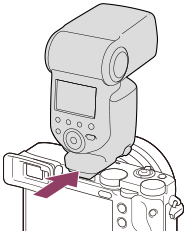
- Shoot after you have turned on the flash and it is fully charged.
 (Charging flash icon) blinking: Charging is in progress
(Charging flash icon) lit up: Charging is finished
- The available flash modes depend on the shooting mode and function.
Hint
- When using a flash with a fast shutter speed, the amount of exposure may be reduced depending on the conditions. If this occurs, you may be able to improve the situation by slowing down the shutter speed or increasing the ISO.
Note
- The light of the flash may be blocked if the lens hood is attached and the lower part of a recorded image may be shaded. Remove the lens hood.
- You cannot use the flash when recording movies. (You can use an LED light when using a flash (sold separately) with an LED light.)
- Before attaching/removing an accessory such as a flash to/from the Multi Interface Shoe, turn off the product first. When attaching an accessory, make sure that the accessory is fixed securely to the product.
- Do not use the Multi Interface Shoe with a commercially available flash that applies voltage of 250 V or more or has the reverse polarity of the camera. Doing so may cause a malfunction.
- For details on compatible accessories for the Multi Interface Shoe, visit the Sony website, or consult your Sony dealer or local authorized Sony service facility.
TP1001776506