


About the recording level guide
While recording is in progress, the recording level guide ( ) appears on the Record screen.
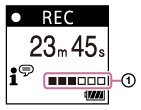
As illustrated above, three or four black squares ( ) on the recording level guide indicate the optimum recording volume levels for the sound source. Adjust the orientation of the built-in microphone, the distance from the sound source, or the sensitivity setting of the microphone to keep the volume within the optimum range. See Selecting the sensitivity level of the built-in microphone (Built-In Mic Sensitivity) for selecting the microphone sensitivity level.
Hint
-
When the input sound volume is low, it is recommended you move your IC recorder closer to the sound source or increase the microphone sensitivity level.
-
While playback is in progress or on standby, you can press and hold
 REC/PAUSE to make your IC recorder pause for recording. This helps you adjust the recording volume level without recording unnecessary audio data.
