


Using the keyboard
-
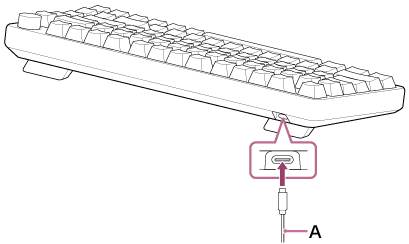
Connect the supplied USB Type-C cable (A) to the USB Type-C port on the keyboard.
-
Connect the USB Type-C cable that is connected to the keyboard to a USB port on a computer.
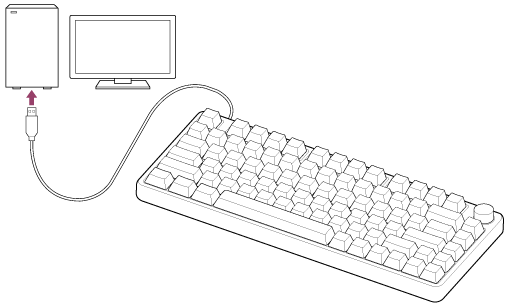
The keyboard is turned on and illumination is displayed on the entire key.
Keyboard operations
Operate the keyboard while it is connected to a computer.
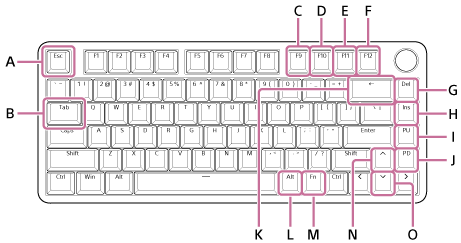
US layout:
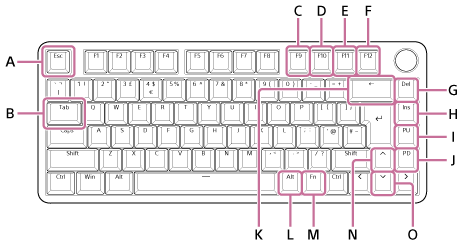
UK layout:
| Function | Operation procedure | Descriptions | Key assignment settings in “INZONE Hub” |
|---|---|---|---|
| Switching keyboard operations | Press the ← key (K) briefly while holding down the Fn key (M). |
Function lock The Fn key is locked. You can use functions assigned to the F1-F12 keys, etc. without pressing the Fn key. Press again to unlock. The Fn key lights up while function lock is enabled. |
Not available |
| Press the Tab key (B) briefly while holding down the Fn key (M). |
Switching profiles Each press toggles through profiles 1 through 4 in sequence. The F1-F4 keys light up in sequence according to the selected profile. |
Not available | |
| Press the Esc key (A) briefly while holding down the Fn key (M). |
ULTRA LOW LATENCY MODE When turning it on, it reduces the response time for key entry. Press again to cancel. All keys are turned off in ULTRA LOW LATENCY MODE. |
Not available | |
| Adjusting the brightness of the key lighting | Press the upward key (N) briefly while holding down the Fn key (M). | The light on the key becomes brighter with each press. | Not available |
| Press the downward key (O) briefly while holding down the Fn key (M). | The light on the key becomes darker with each press. | Not available | |
| Adjusting volume | Turn the volume dial clockwise. | The volume of the computer is increased. | Not available |
| Turn the volume dial counterclockwise. | The volume of the computer is decreased. | Not available | |
| Press the volume dial. | Press to mute. Press again to unmute. | Not available | |
| Windows operations | Press the F9 key (C) briefly while holding down the Fn key (M). | You can return to the previous song. | Available |
| Press the F10 key (D) briefly while holding down the Fn key (M). | You can play or stop the current song. | Available | |
| Press the F11 key (E) briefly while holding down the Fn key (M). | You can skip to the next song. | Available | |
| Press the F12 key (F) briefly while holding down the Fn key (M). | You can mute or unmute the sound. | Available | |
| Press the Del key (G) briefly while holding down the Fn key (M). | You can perform the function of the Home key. | Available | |
| Press the Ins key (H) briefly while holding down the Fn key (M). | You can perform the function of the End key. | Available | |
| Press the PU key (I) briefly while holding down the Fn key (M). | You can perform the function of the Print Screen key. | Available | |
| Press the PD key (J) briefly while holding down the Fn key (M). | You can perform the function of the Scroll Lock key. | Available | |
| Press the Alt key (L) briefly while holding down the Fn key (M). (The Alt key (L) is located to the left of the Fn key (M).) |
You can perform the function of the Pause key. | Available |
Hint
- You can assign other functions to specific keys by using the key assignment settings of “INZONE Hub”. However, some keys, such as those for switching keyboard operations or adjusting the brightness of key lighting, can still be used for the key operations listed in the table above.
- The Esc key (A) is labeled as the ECH key for the FR layout.