


mocopi PC application (connecting to 6 sensors)
By using the mocopi PC application, you can perform motion capture and live streaming on your PC more easily than before.
Because Windows PCs cannot connect to all 6 sensors simultaneously, you will need your smartphone and the dedicated mobile app (mocopi link) to use the mocopi PC application.
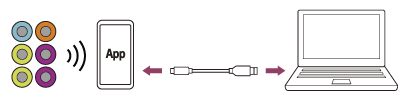
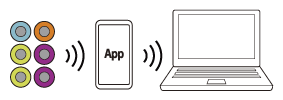
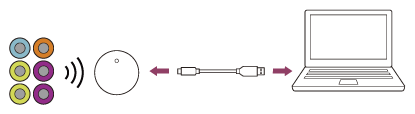
Data can be sent from your smartphone to your PC via two connection methods: a wired connection using a USB cable, or a wireless connection. Also, you can send data from the sensors directly to your PC without your smartphone if you use the separately sold Sensor data receiver for mocopi (QM-PR1).
For details on how to use the mocopi PC application, see the link below.
https://www.sony.net/Products/mocopi-dev/en/documents/mocopiPC/HowTo_mocopiPC.htmlWired connection (6 sensors/smartphone/USB Type-C cable/PC)
Wireless connection (6 sensors/smartphone/PC)
Connection via the Sensor data receiver for mocopi (QM-PR1) (6 sensors/one QM-PR1 unit/USB Type-C cable/PC)
TP1002005833
