
SONYHelp Guide

Mobile Motion CaptureQM-SS1

  • menu
  • Search
  • Printable PDF


Quick Startup Guide

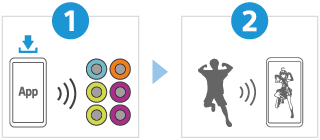
Download the mocopi app

The mocopi app is an application that allows Mobile Motion Capture to be used on smartphones.

Download the version of the app for your smartphone.

Let’s start use
  • Pairing the sensors

    When you are using the device for the first time, pair the sensors using the mocopi app to prepare for motion capture.
    Follow the on-screen instructions to connect the sensors, install the sensors, attach the sensors to your body and perform calibration.


  • Performing motion capture (Overview of the motion capture screen)

    Attach the sensors to your body and make movements to move an avatar, convert movements into motion data or record movements on the mocopi app.


Related information

Charging

Connecting the sensors

Recording in Video mode

Recording in Motion mode

Sensor data receiver for mocopi (QM-PR1)

Sensor bands for mocopi (QM-PB1)

Go to Page Top
    • About this Help Guide
    • Device unit parts
    • Charging
    • Installing the mocopi app
    • Pairing the sensors
    • Connecting the sensors
      • Installing the sensors
      • Removing the sensors
    • Attaching the sensors to your body
    • Performing calibration
    • Overview of the motion capture screen
      • Recording in Video mode
      • Changing avatars
      • Importing a custom avatar from an external device
      • Changing the background
      • Recording in Motion mode
      • Setting up an external device
      • Sending motion data to an external device
      • Resetting the pose
      • Recalibration
    • mocopi PC application (connecting to 6 sensors)
    • mocopi link
    • mocopi Professional Mode
    • mocopi PC application (connecting to 12 sensors)
    • XYN Motion Studio
    • Sensor data receiver for mocopi (QM-PR1)
    • Sensor bands for mocopi (QM-PB1)
    • Precautions
    • When you have finished using the device units
    • Maintenance
    • If the sensors or charging case gets wet
    • Trademarks
    • Legal information
    • FCC Statement

H-242-100-13(1)
Copyright 2023 Sony Corporation
Go to Page Top