


Part names
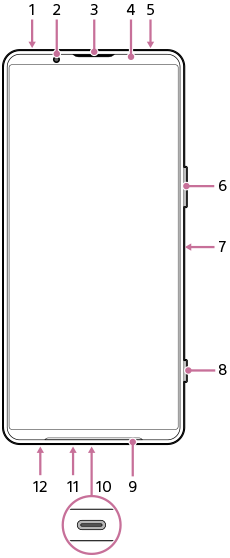
- 3.5 mm audio jack
- Front camera
- Ear speaker/Second loudspeaker
- Proximity sensor/Light sensor
- Second microphone
- Volume button/Zoom button (up/down)
- Power button/Fingerprint sensor
- Shutter button
Hint
-
You can assign a different action to the shutter button when not using the Camera app. To turn the setting on or off, find and tap as follows, and then tap the switch for the desired setting.
-
Taking a screenshot by pressing the shutter button
[Settings] > [System] > [Gestures] > [Shutter button] > [Take a screenshot]
-
Launching the Camera app by long-pressing the shutter button
[Settings] > [System] > [Gestures] > [Shutter button] > [Launch Camera app]
-
-
- Main loudspeaker
- USB Type-C® port
You can view the screen of your device on a TV or other large display device using a USB Type-C cable.
You can also access the internet via a LAN cable by using a commercially available USB-LAN adapter.
Note
- When you connect your device to a TV or other large display using a USB Type-C cable, the cable must be compatible with the display port standard. Note that some functions or content on your Xperia device may not be displayable on the TV or display device.
- Some USB-LAN adapters may not work properly.
- Main microphone
- SIM card/microSD card tray
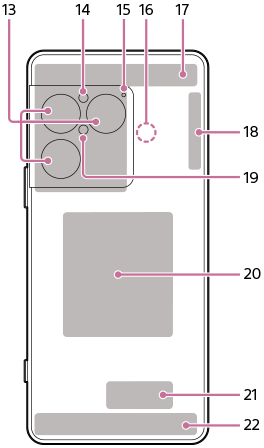
- Main camera
- Light sensor
- Voice priority microphone
- NFC detection area
- 5G/4G antenna
- 5G/4G/Wi-Fi®/Bluetooth/GPS antenna
- Light/Flash
- Wireless charging coil
- Wi-Fi/Bluetooth antenna
- 5G/4G antenna
TP1002272108