


Structure of the Screen for Mobile Devices
The Planning screen displays the shooting plans (planning metadata) assigned to the user logged in on the mobile device. This is used to send and load the shooting plan into a camcorder.
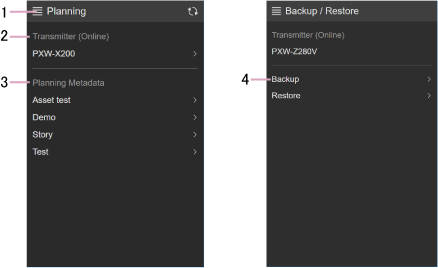
1. Menu
The following menu is displayed.
- Planning: Display the Planning screen.
- Backup/Restore: Display the Backup/Restore screen.
- Select Transmitter: Select a camcorder.
- Sign out: Sign out from the service.
2. Transmitter
Displays the selected camcorder.
Tap the displayed camcorder to display a list of the planning metadata stored in the camcorder.
To select another camcorder, select [Select Transmitter] from the menu.
3. Planning Metadata
Displays the planning metadata that is assigned to the signed-in user.
Tap the displayed planning metadata to display more details.
You can transfer and load planning metadata into a camcorder from the planning metadata details screen.
4. Backup/Restore
Use to back up and restore the settings for the camcorder selected in [Transmitter].
