


Streaming to an SNS or External System
You can distribute streaming video from a camcorder to an SNS (social networking service) or external system automatically. To do this requires creating a cloud receiver in the Receiver area.
Note
- This function cannot be used if the codec of the transmitter is set to HEVC.
-
Click the [+] button in the Receiver area of the Live screen.The dialog for creating a cloud receiver appears.
-
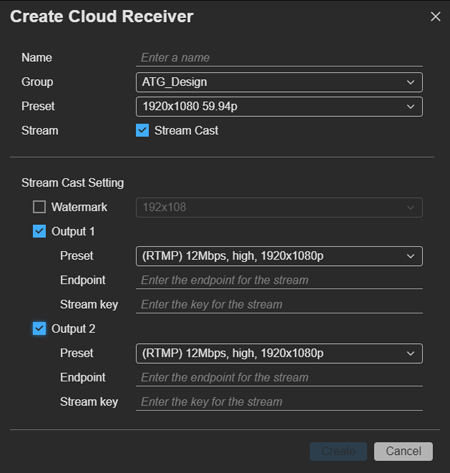
Place a check mark in [Stream Cast] in [Stream].
-
Specify [Name], [Group], and [Preset].[Preset] determines the type of cloud receiver. Depending on this setting, the values of [Preset] for [Output] in [Stream Cast Setting] that can be selected will vary.
-
Configure the settings for streaming to an SNS or external system.
- Watermark: To display a watermark on the streamed video, select a preconfigured watermark. Watermarks are configured using [Resource] > [Watermark Preset] on the Settings screen.
- Output 1/Output 2: Place a check mark beside each output to use for streaming, and configure the output format, endpoint, and stream key.
- Preset: Select a streaming preset.
- Endpoint: Specify the SNS or external system endpoint.
- Stream Key: Specify the SNS or external system stream key.
Note
- The SNS or external system must first be set to streaming enabled state. When setting up streaming, set the endpoint and the stream key values that are acquired by the SNS or external system for the stream caster.
-
Click the [Create] button.A cloud receiver is created in the Receiver area.
-
To start streaming, drag & drop the streaming transmitter onto the cloud receiver.
Note
- The maximum time that a stream can be continuously cast to an SNS is 1 hour.
- To check the status of each output after recording starts, select a cloud receiver, click the
 button, select [View Detail] from the displayed menu, and check [Status] and [Statistics] in the [Cloud Receiver] dialog.
To stop streaming
Click [Stop] on the [Streaming] tab.
