


FM Radio screen (Except for the NW-A55L)
You can listen to FM radio.
To switch to the FM radio function
Tap  on the library screen.
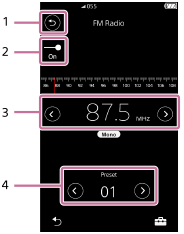
-
 button
Tap the button to switch back to the music playback function.
-
FM radio switch (On/Off)
Connect a pair of headphones to turn on the switch. The headphone cord works as an antenna.
-
Frequency
Tap
 /
/ to change the frequency.
 -
Preset number
Tap
/ to select a preset station.
Option/setting menu
Tap  to display the menu.
Available menu items may differ depending on the screen or settings.
| Save to Preset | Select the item to save the currently selected broadcast station as a preset. |
| Delete from Preset | Select the item to delete the currently selected broadcast station from the presets. |
| Auto Preset | Select the item to automatically search for and preset broadcast stations in your area. |
| FM Radio Settings |
Select the item to configure the FM radio settings. (Scan Sensitivity, Mono/Auto) |

The contents of the Help Guide may be subject to change without notice due to updates to the product's specifications.
