


Basic icons displayed on the monitor
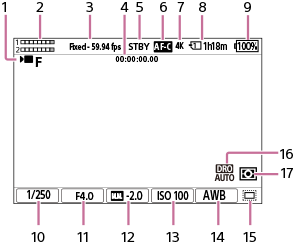
This section describes the screen display when the shooting mode is  (Flexible Exp. Mode) for movie shooting and
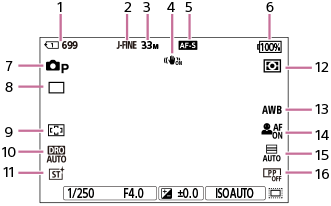
  (Program Auto) for still image shooting.
- The following is an example of the display when [DISP (Screen Disp) Set] is set to [Display All Info.] and the touch function icons are hidden.
- The displayed content and positions are for reference only, and may differ from the actual display. Some icons may not be displayed depending on the camera settings.
- For information on how to show/hide the touch function icons and examples of the touch function icon display, refer to “Touch function icons.”
During movie recording
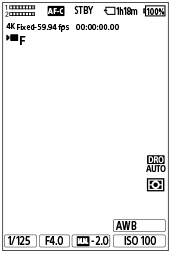
Display when holding the camera vertically
-
[
 Shoot Mode] is set to (Flexible Exp. Mode).
 - Audio level
- [Fixed/Variable Select] is set to [Fixed] and [Rec Frame Rate] is set to [59.94p].
- Time code
- The camera is in the shooting standby mode.
- The focus mode is set to [Continuous AF].
-
[File Format] is set to [4K].
- Slot number of the memory card recording the shooting data and recordable movie time
- Remaining battery level
- Shutter speed
- Aperture value
- Exposure compensation
- ISO sensitivity
-
[
 White Balance] is set to [Auto].
 -
[
 Shooting] is set to [On] or [Auto], and the recordable area is the APS-C-equivalent size.
 - [D-Range Optimizer: Auto] is selected.
-
[Metering Mode] is set to [Multi].
During still image shooting
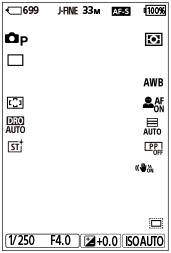
Display when holding the camera vertically
- Slot number of the memory card recording the shooting data and recordable number of still images
- [JPEG/HEIF Switch] is set to [JPEG]. [JPEG Quality] is set to [Fine].
- [JPEG Image Size] is set to [L: 33M].
- [
 SteadyShot] is set to [On].
 - The focus mode is set to [Single-shot AF].
- Remaining battery level
-
[Shoot Mode] is set to [Program Auto].
- [Drive Mode] is set to [Single Shooting].
- [Focus Area] is set to [Wide].
- [D-Range Optimizer: Auto] is selected.
- [Creative Look] is set to [ST(Standard)].
-
[Metering Mode] is set to [Multi].
- [White Balance] is set to [Auto].
-
[Subject Recog in AF] is set to [On] and [Recognition Target] is set to [Human].
- [Shutter Type] is set to [Auto].
- [Picture Profile] is set to [Off].
TP1001667061