


Still/Movie switch
You can use the Still/Movie switch to select a shooting mode.
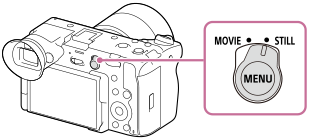
You can select the still image shooting mode or movie recording mode as the shooting mode using the Still/Movie switch.
Hint
- After selecting the still image or movie recording mode, press and hold the Fn (Function) button to display the [
 Shoot Mode] or [
 Shoot Mode] screen and select the desired exposure mode.
 - The menu items displayed in the [Shooting], [Exposure/Color], and [Focus] tabs of the menu screen vary depending on the shooting mode (still image/movie). Before you adjust these settings, select the desired shooting mode with the Still/Movie switch.
- For each item in still image shooting and movie recording, you can select whether to use a common setting or separate settings. Select the items you want to set separately in [Different Set for Still/Mv].
TP1001665628