


Sides
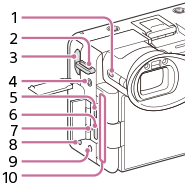
- 7 button (Custom button 7)
- Hooks for shoulder strap (sold separately)
- HDMI type A jack
- Thread hole for accessories
Uses M3 screws
Use an accessory with a screw less than 3.5 mm (1/8 inches) long. Otherwise, you will be unable to firmly secure the accessory, and damage to the camera may occur.
- Multi/Micro USB Terminal
This terminal supports Micro USB-compatible devices.
- USB Type-C® terminal
- Charge lamp
-
 (Microphone) jack
When an external microphone is connected, the built-in microphone and the XLR handle unit (supplied or sold separately) turn off automatically. When the external microphone is a plugin-power type, the power of the microphone is supplied by the camera.
-
 (Headphones) jack
 - Ventilation outlet
Do not use the camera while touching the area around the ventilation outlet for a long time. Doing so may cause low-temperature burns.
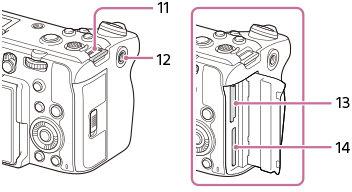
- Hooks for shoulder strap (sold separately)
- Thread hole for accessories
Supports 1/4-20 UNC screws
Use an accessory with a screw less than 5.5 mm (7/32 inches) long. Otherwise, you will be unable to firmly secure the accessory, and damage to the camera may occur.
- SLOT 1 (Memory card slot 1)
- SLOT 2 (Memory card slot 2)
Notes on USB terminals
You can use either the USB Type-C terminal or the Multi/Micro USB Terminal for USB communications. However, you cannot conduct USB communications with both terminals simultaneously. Use the USB Type-C terminal to supply power and charge the battery pack. This camera cannot be powered via the Multi/Micro USB terminal.
- You can use accessories for the Multi/Micro USB Terminal, such as a remote commander (sold separately), while supplying power or performing remote shooting using the USB Type-C terminal.
Notes on the terminal cover
Ensure that the terminal cover is closed before use.