


Main menu (shooting setting list)
Select the  (Main) tab on the menu screen to display a list of shooting settings. You can confirm the settings before shooting or for each scene, and also change the settings directly from this screen.
Main menu for shooting movies
Main 1
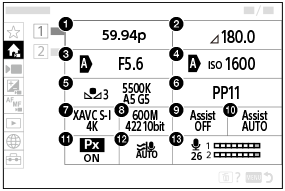
-
Rec Frame Rate *1
-
Shutter angle*2
-
Aperture
-
ISO
-
White Balance
-
Picture Profile
-
 File Format
-
Record Setting
-
Gamma Display Assist
-
Gamma Disp. Assist Typ.
-
 Proxy Recording
-
Wind Noise Reduct.
-
Audio Rec Level
*1When [Fixed/Variable Select] is set to [Variable], both [Rec Frame Rate] and [FPS Select] are displayed.
*2When [Shutter Mode] is set to [Speed], the shutter speed is displayed.
Main 2
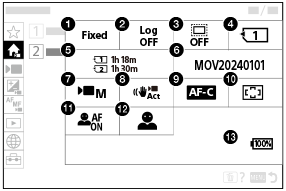
-
Fixed/Variable Select
-
Log Shooting Setting
-

 Shooting
-
Recording Media
-
Available recording time
-
File Settings
-
Shoot Mode
-
SteadyShot
-
Focus Mode
-
Focus Area
-
Subject Recog in AF
-
Recognition Target
-
Remaining battery level
Main menu for shooting still images
Main 1
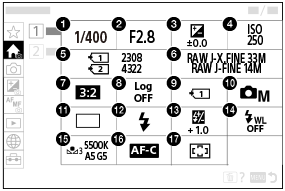
-
Shutter Speed *
-
Aperture *
-
Exposure Comp.
-
ISO
-
Number of recordable images
-
Image Quality Settings
-
Aspect Ratio
-
 Log Shooting Setting
-
Rec. Media Settings
-
Shoot Mode
-
Drive Mode
-
Flash Mode
-
Flash Comp.
-
Wireless Flash
-
White Balance
-
Focus Mode
-
Focus Area
* When the shooting mode is [Program Auto], the shutter speed and aperture value are displayed in the same area. You can perform Program Shift by selecting the area.
Main 2
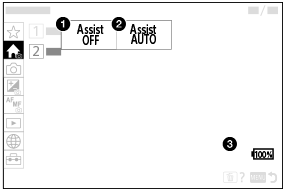
-
Gamma Display Assist
-
Gamma Disp. Assist Typ.
-
Remaining battery level
Hint
- If you assign the [Display Main Menu] function to the desired key using the custom key settings, you can also open the Main menu by pressing the assigned key.
- You can open the setting screens by touching the icons on the main menu when [Touch Operation] is set to [On] and [Menu Screen] under [Touch Panel Settings] is set to [On].
- Touch the item for available recording time/number of recordable images to open the [Format] screen.