


Wearing the headset
-
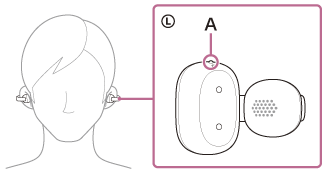
Check the L-mark and the R-mark on the headset units.
The one with the L-mark is for the left ear and the one with the R-mark is for the right ear. There is a tactile dot (A) on the left headset unit.
-
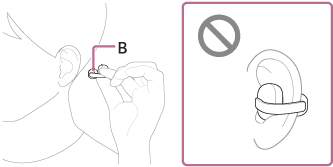
Pinch the headset with your fingers.
Hold the headset so that the earcuff body (small) (B) faces toward the ear canal side.
-
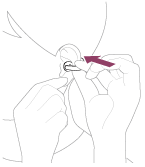
Clamp the headset to the outside of your ear to put it on.
Gently pull your earlobe and clamp the headset on the thin edge of your ear, similar to when putting on an ear cuff.
-
Adjust the headset to your preferred position.
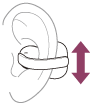
If the headset does not stay securely on your ear, attach the supplied fitting cushions to the flexible clip of the headset.
The effects of headset position on sound quality, volume, call sound quality
The position of the headset affects sound quality, volume, and call quality. If the headset is not positioned correctly, you may feel that the sound quality is not optimal, or there may be a difference in volume between both headset units.
If any of this applies, see step 4 and adjust the headset to a position where sound quality is optimal and the volume is balanced between both headset units.
Attaching and detaching the supplied fitting cushions may help improve the fit of the headset.
About the instruction manual video
Watch the video to find out how to put the headset on your ears. No audio explanation is available.
Models for countries and regions excluding Chinese mainland and Japan:
https://rd1.sony.net/help/mdr/mov0100/h_zz/
Models for Chinese mainland:
https://rd1.sony.net/help/mdr/mov0100/zh-cn/
Models for Japan:
https://rd1.sony.net/help/mdr/mov0100/ja/
Hint
- You can play music as well as make and receive calls even when you are wearing only one headset unit in your ear.