


Disconnecting Bluetooth connection (after use)
-
Disconnect the Bluetooth connection by operating the Bluetooth device.
You will hear a notification sound from the headset, indicating that the connection has been disconnected.
-
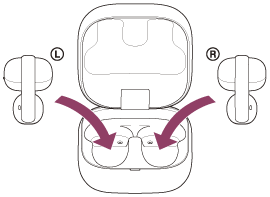
Set the headset units into the charging case, and close the charging case lid.
Put the left-side headset unit back into the left hole of the charging case. Put the right-side headset unit back into the right hole of the charging case. There is a tactile dot on the left-side headset unit. Each headset unit will be set to the correct position in the charging case by the built-in magnet.
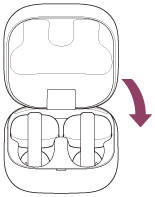
The headset turns off.
Hint
- When you finish playing music, the Bluetooth connection may terminate automatically depending on the Bluetooth device.
TP1002088417