SONY

Wireless Stereo HeadsetLinkBuds ClipHelp Guide

Table of Contents
Table of Contents
  • Top
    • Using the headset
    • Using the “Sound Connect” app
    • About the voice guidance
      • Included items
      • Attach the fitting cushions
      • Location and function of parts
      • About the indicator
      • Wearing the headset
      • Using only one headset unit
      • About tap controls
      • Charging
      • Available operating time
      • Checking the remaining battery charge
      • Turning on the headset
      • Turning off the headset
    • How to make a wireless connection to Bluetooth devices
      • Connecting with the “Sound Connect” app
      • Pairing and connecting with an Android smartphone
      • Connecting to a paired Android smartphone
      • Pairing and connecting with an iPhone
      • Connecting to a paired iPhone
      • Pairing and connecting with a computer (Windows® 11)
      • Pairing and connecting with a computer (Mac)
      • Connecting to a paired computer (Windows 11)
      • Connecting to a paired computer (Mac)
      • Pairing and connecting with a Bluetooth device
      • Connecting to a paired Bluetooth device
      • Connecting the headset to 2 devices simultaneously (multipoint connection)
    • Disconnecting Bluetooth connection (after use)
      • Listening to music from a device via a Bluetooth connection
      • Controlling the audio device (Bluetooth connection)
      • Switching sound settings according to the content or usage scenario (listening mode)
    • Receiving a call
    • Making a call
    • Functions for a phone call
    • Making a video call on your computer
    • Using Google™ Gemini
    • Using Tencent Xiaowei
    • Using the voice assist function (Google app)
    • Using the voice assist function (Siri)
    • Precautions
    • Supported codecs
    • How to keep the software up-to-date (for comfortable use of the headset)
    • When you have finished using the headset
    • Maintenance
    • To prevent burning or malfunction due to getting wet
    • When the headset units or charging case gets wet
    • Licenses
    • Trademarks
    • Troubleshooting
    • Resetting the headset
    • Initializing the headset to restore factory settings
    • Specifications
Close


Model: YY2999

Quick Start Guide

To prevent burning or malfunction due to getting wet

Download the app, and set up the headset

Many useful features are out there in your device. Download the “Sound Connect” app and get the most out of what you have.

For the main features available with the “Sound Connect” app, see “Using the “Sound Connect” app”.

Let’s start to use

  • Wearing the headset

    Hold the headset so that the earcuff body (small) faces toward the ear canal side.
    Gently pull your earlobe and clamp the headset on the thin edge of your ear, similar to when putting on an ear cuff.
    If the headset does not fit securely on your ear, attach the supplied fitting cushions.

  • Establishing a BLUETOOTH® connection

    The headset turns on when it is removed from the charging case.
    Follow the downloaded “Sound Connect” app instructions.


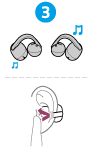
  • Operating the headset

    Tap the headset unit.

    Left-side headset unit

    Tap twice: You can switch between the listening modes.

    Tap 3 times: You can use Quick Access (settings on the “Sound Connect” app are required).

    ...Tap 5 or more times: You can decrease the volume.

    Right-side headset unit

    Tap twice: You can play or pause music.

    Tap 3 times: You can skip to the beginning of the next track.

    ...Tap 5 or more times: You can increase the volume.

Operating the headset (see the video for details)

Related information

Establishing a Bluetooth connection manually

Charging the headset


WF-LC900

  • Download PDF

Go to Page Top
Language Selection Page
5-071-247-11(1)
Copyright 2026 Sony Corporation