


Turning off the headset
-
Set the headset units into the charging case.
Put the left-side headset unit back into the left hole of the charging case. Put the right-side headset unit back into the right hole of the charging case. There is a tactile dot on the left-side headset unit.
When putting the headset back into the charging case, insert the earcuff body (small) first.
Each headset unit will be set to the correct position in the charging case by the built-in magnet.
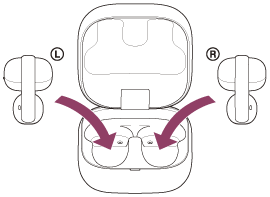
When the rechargeable battery of the charging case still has power, the indicator on the charging case lights up in orange or green for about 6 seconds.
The charging starts on the headset. Close the charging case lid.
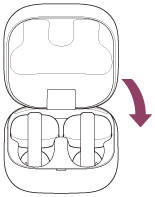
The headset turns off.
When the headset is left removed
After 15 minutes of Bluetooth disconnection, the headset turns off automatically.
To turn off the power before the headset turns off automatically, set the headset units into the charging case, and close the charging case lid.
Be sure to close the charging case lid to prevent the battery of the charging case from being consumed.
Hint
- You can also turn off the headset with the “Sound Connect” app.
Note
- When the remaining battery charge of the charging case is not sufficient, the charging of the headset will not start. Charge the charging case.