


Controlling the audio device (Bluetooth connection)
If your Bluetooth device supports the AVRCP profile’s operating function, the following operating procedures are available. The available functions may vary depending on the Bluetooth device, so refer to the operating instructions supplied with the device.
You can use the right-side headset unit to perform the following operating procedures.
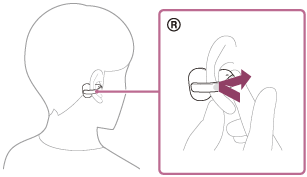
- Play/Pause: Tap the headset unit twice quickly with an interval of about 0.2 seconds.
- Skip to the beginning of the next track: Tap the headset unit 3 times quickly with an interval of about 0.2 seconds.
- Increase the volume: Tap the headset unit 5 or more times quickly with an interval of about 0.2 seconds between taps during music playback.
As you repeatedly tap the headset, a notification sound is emitted and the volume increases by 1 step every 0.4 seconds, regardless of the number of times you tap.
When the volume reaches the maximum, an alarm sounds.
You can use the left-side headset unit to perform the following operating procedures.
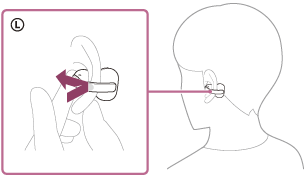
- Switch the listening mode: Tap the headset unit twice quickly with an interval of about 0.2 seconds during music playback.
The modes switch in the order of standard, voice boost, and sound leakage reduction. - Quick Access: Tap the headset unit 3 times quickly with an interval of about 0.2 seconds. Settings on the “Sound Connect” app are required.
- Lower the volume: Tap the headset unit 5 or more times quickly with an interval of about 0.2 seconds between taps during music playback.
As you repeatedly tap the headset, a notification sound is emitted and the volume lowers by 1 step every 0.4 seconds, regardless of the number of times you tap.
When the volume reaches the minimum, an alarm sounds.
For details on tap controls, refer to “About tap controls”.
Note
- You cannot adjust the volume with the headset when no music is playing.
- If the communication condition is poor, the Bluetooth device may malfunction in response to the operating procedure on the headset.
- The available operating procedures may vary depending on the connected device, the music software, or the app being used. In some cases, the device may function differently or may not work even if the above operating procedures described are performed.
TP1002088441