


Using the voice assist function (Google app)
By linking with the Google app on your Android smartphone, you can operate the Android smartphone by voice while wearing the headset.
-
Set the assist and voice input selection to the Google app.
On the Android smartphone, select the following menus.
[Settings] - [Apps & notifications] - [Advanced] - [Default apps] - [Assist & voice input]
Then, set [Assist app] to the Google app.The above operating procedure is an example. For more details, refer to the operating instructions supplied with the Android smartphone.
The latest version of the Google app may be required.
Models for countries and regions excluding Chinese mainland:
For details on the Google app, refer to the operating instructions or the support website of the Android smartphone, or the Google Play store website.
Models for Chinese mainland:
For details on the Google app, refer to the operating instructions or the support website of the Android smartphone.
The Google app may not be activated from the headset depending on specifications of the Android smartphone.
-
Put the headset units on your ears and connect the headset to the Android smartphone via a Bluetooth connection.
-
Open the “Sound Connect” app and set the function of either the left or right headset unit as [Voice Assist Function].
-
When the Android smartphone is in standby or playing music, tap the headset to which you assigned the voice assist function twice quickly with an interval of about 0.2 seconds.
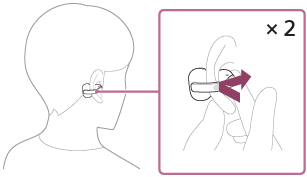
The Google app is activated.
-
Talk to Google through the app using the headset’s microphones (A).

For details on the apps which work with the Google app, refer to the operating instructions for the Android smartphone.
After launching the Google app, voice input will be disabled if no speech is recorded for a certain period of time.
For details on tap controls, refer to “About tap controls”.
Note
- The voice assist function (Google app) and Google Gemini cannot be assigned to the headset at the same time.
- The voice assist function (Google app) and Tencent Xiaowei/QQ Music cannot be assigned to the headset at the same time.
- The Google app may not be activated depending on specifications of the smartphone or application version.
- The Google app does not work when connected to a device not compatible with the voice assist function.