


Activating or deactivating the BLUETOOTH function
You can connect to the speaker from a paired BLUETOOTH device when the speaker’s BLUETOOTH function is activated.
At the time of purchase, the BLUETOOTH function is activated.
- Press and hold the ECHO button and the LIGHT button on the speaker simultaneously for about 5 seconds.
The BLUETOOTH indicator on the speaker goes out and the BLUETOOTH function is deactivated.
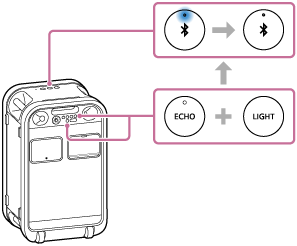
When you press and hold the ECHO button and the LIGHT button on the speaker simultaneously for about 5 seconds once again, the following events occur:
-
The BLUETOOTH indicator on the speaker lights up.
-
The BLUETOOTH function is activated.
-
Hint
-
With the device that is previously connected via a BLUETOOTH connection, the speaker is reconnected when the BLUETOOTH function is activated on the speaker. However, to make this possible, the BLUETOOTH function must remain active on the device.
Note
-
While the BLUETOOTH function is deactivated, you cannot perform the following actions.
-
Pair or connect with BLUETOOTH device.
-
Use the “Sound Connect” app.
-