


Connecting the speaker concurrently with 2 BLUETOOTH devices (multipoint connection)
While the speaker is connected concurrently with 2 BLUETOOTH devices via BLUETOOTH connections, you can do the following:
-
Switching the music playback source between 2 devices
You can switch the music playback source from one device to the other without reestablishing the BLUETOOTH connection.
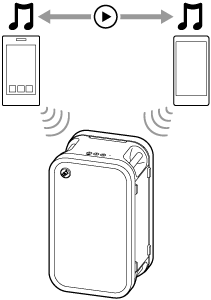
Connecting the speaker concurrently with 2 devices via BLUETOOTH connections
- Connect the speaker with the first BLUETOOTH device.
For details about the BLUETOOTH connection procedure, see one of the following that is applicable to your device.
- While you keep the speaker connected with the first BLUETOOTH device, press the BLUETOOTH button on the speaker.
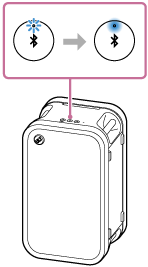
You hear the voice guidance from the speaker (Pairing). Then, the BLUETOOTH indicator on the speaker starts double flashing. The speaker enters pairing mode.
- Operate the second BLUETOOTH device to search for the speaker.
- Follow the on-screen instructions to establish a BLUETOOTH connection.
When the BLUETOOTH connection is established, you hear the notification sound from the speaker. Then, the activity of the BLUETOOTH indicator on the speaker changes from flashing to lit.
Changing the BLUETOOTH devices in multipoint connection
While you keep the speaker connected with 2 devices in multipoint connection, you can attempt to connect another device via a BLUETOOTH connection.
When you operate the speaker and the third device in an attempt to establish a BLUETOOTH connection, the following events occur in succession.
-
The BLUETOOTH connection with one of the 2 devices that is used for the previous music playback is retained.
-
The BLUETOOTH connection with the other device is disconnected.
-
A new BLUETOOTH connection is established between the speaker and the third device.
Music playback while the speaker is connected with 2 devices in multipoint connection
-
When you operate the speaker to play music, music starts playing on one of the devices in multipoint connection that was used for the previous playback.
-
To play music on the other (second) device in multipoint connection, operate the second one to start music playback.
In some circumstances, the speaker may fail to switch the music playback source. In other words, the speaker may continue to play music from the original (first) device after you operate the second device to start playback. In such a case, stop the playback on the first one. Then, you can listen to music playing on the second one.
Hint
-
While the BLUETOOTH function is activated on BLUETOOTH devices, one of the devices is reconnected with the speaker right after the speaker turns on. This applies to the BLUETOOTH device that has the previous BLUETOOTH connection with the speaker.
-
With the “Sound Connect” app, you can adjust various settings such as the following.
-
Establishing or disconnecting BLUETOOTH connections
-
Unpairing BLUETOOTH devices
-
Note
-
While the Stereo Pair function or the Party Chain function is activated, you cannot use the multipoint connection capability.
-
Depending on the BLUETOOTH device, you may not be able to use the multipoint connection capability.
-
The multipoint connection cannot be disabled.