


Charging the speaker
The speaker is capable of running on either of the following power supplies.
-
Power supply from an AC outlet through the supplied AC power cord (mains lead)
-
Power supply from the built-in rechargeable battery
When using the speaker for the first time, be sure to charge the built-in battery for more than 1 hour before turning on the speaker.
With the built-in battery charged in advance, you can use the speaker solely with battery power.
Hint
-
For charging the built-in battery of the speaker, the Battery Care mode option is available in addition to the normal charging method. Battery Care mode limits the maximum charge capacity to approximately 90% and makes the battery life last longer. The playback time available in Battery Care mode is shorter than the time available when the built-in battery is charged by the normal charging method. At the time of purchase, the speaker is not in Battery Care mode.
-
You can enable or disable Battery Care mode with the “Sound Connect” app while the speaker is turned on.
- Connect the speaker to an AC outlet to charge it.
Connect the AC input jack and an AC outlet with the supplied AC power cord (mains lead). The AC input jack is located behind the cap on the rear side of the speaker.
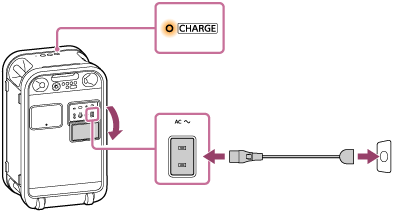
Battery charging starts and the CHARGE indicator on the speaker lights up in orange. Charging will complete in about 3 hours (*) and the indicator will turn off.
(*) Time required for the empty battery to be fully charged (100%) while the speaker is powered off.
After you disconnect the supplied AC power cord (mains lead) from the speaker, be sure to securely close the cap.
The cap plays a very important role in maintenance of the water resistant performance.
Checking the charging completion
When the built-in battery is fully charged and you try to charge it again, the CHARGE indicator on the speaker lights up in orange. Then, it turns off after about 1 minute.
Checking the remaining level of the rechargeable built-in battery
You can enable the voice guidance feature so that the speaker outputs voice guidance about the remaining battery power when the speaker turns on. To enable the voice guidance feature, use the “Sound Connect” app. When the feature is enabled, you hear the voice guidance that matches the remaining battery power when you turn on the speaker. The following lists the voice guidance that you may hear.
81% - 100%: “Battery fully charged”
81% - 90% (Battery Care mode): “Battery Care Mode, Fully Charged, Battery About 90%”
61% - 80%: “Battery about 80%”
41% - 60%: “Battery about 60%”
21% - 40%: “Battery about 40%”
1% - 20%: “Low Battery”
Battery hours of the built-in rechargeable battery
-
Approximately 30 hours
-
The Battery Care mode is disabled.
-
A BLUETOOTH connection is established.
-
The volume level is set to 17.
-
The sound mode is set to ULT1 or ULT2.
-
The lighting function is deactivated.
-
-
Approximately 15 hours
-
The Battery Care mode is disabled.
-
A BLUETOOTH connection is established.
-
The volume level is set to 17.
-
The sound mode is set to ULT1 or ULT2.
-
The lighting function is activated.
-
-
Approximately 3 hours
-
The Battery Care mode is disabled.
-
A BLUETOOTH connection is established.
-
The volume level is set to 50 (maximum).
-
The sound mode is set to ULT1 or ULT2.
-
The lighting function is activated.
-
Time required for charging the built-in rechargeable battery
-
Approximately 3 hours (*)
10 minutes of charging provide approximately 180 minutes of music playback.
-
The Battery Care mode is disabled.
-
The volume level is set to 17.
-
The sound mode is set to ULT1 or ULT2.
-
The lighting function is deactivated.
-
(*) Time required for the empty battery to be fully charged (100%) while the speaker is powered off.
The battery hours of the built-in rechargeable battery above is measured using our specified music source.
Actual performance time may vary from the listed time due to the following factors.
-
Volume of the speaker
-
Songs that are playing on the speaker
-
Surrounding temperatures of the speaker
-
Usage conditions of the speaker
When the built-in battery is running low
Depending on the remaining battery power, the voice guidance or the speaker behaves as follows.
-
“Low Battery”
The built-in battery is running low. The CHARGE indicator on the speaker starts flashing slowly. The speaker will automatically turn off after a while. Charge the speaker. The speaker may not be capable of supplying power to other devices.
-
“Battery is empty”
The built-in battery is empty. Even if you try to turn on the speaker, the speaker cannot be turned on. Charge the speaker.
-
The CHARGE indicator on the speaker flashes 3 times in orange when you try to turn on the speaker.
The built-in battery is nearly empty. The speaker cannot be turned on. Charge the speaker.
Hint
-
As long as the speaker is connected to an AC outlet by the supplied AC power cord (mains lead), the speaker can charge the built-in battery. Battery charging is also possible while the speaker is playing music. However, battery charging may take a long time depending on how the speaker is being used.
-
Enable the STAMINA power option on the “Sound Connect” app to reduce power consumption while using the built-in battery. This allows you to enjoy longer music playback.
Note
-
The maximum power output of the speaker may be lower when the built-in battery is running low.
-
For safety reasons, the speaker automatically stops charging in the following cases.
-
When the speaker is charged in an extremely hot or cold environment
-
When charging takes too long
To resolve this issue, disconnect the AC power cord (mains lead) and connect it once again in the operating temperature range of 5 °C to 35 °C (41 °F to 95 °F).
-
-
If the built-in battery is under a high load during battery charging, charging stops for safety. In such a case, turn down the volume or stop the playback.
-
Do not charge the speaker’s built-in battery in places where water may splash on the speaker. The supplied accessories and the ports and jacks are not designed to be water resistant.
-
Even when you do not intend to use the speaker for a long time, charge the built-in battery sufficiently to maintain the speaker’s performance. Charge the battery once every 6 months.