


Using an external microphone
You can output your voice from the speaker by connecting a commercially available dynamic microphone to the speaker. Use a dynamic microphone with the standard plug of Φ 6.3 mm.
- Turn the MIC level knob behind the cap on the rear side of the speaker to MIN to reduce the microphone volume level.
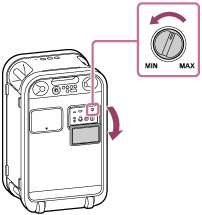
- Connect an external microphone to the MIC jack behind the cap on the rear side of the speaker.
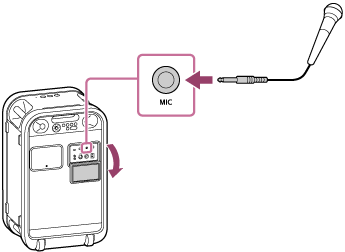
- Adjust the volume with the MIC level knob on the speaker.
- Speak or sing into the connected microphone.
With the KEY CONTROL buttons or the ECHO button on the speaker, you can perform the following functions as well.
Key Control
You can change the key of a song you sing.
Press the KEY CONTROL buttons on the speaker to adjust the key to suit your vocal range. Press the flat button to decrease the key or the sharp button to increase the key.
Mic Echo
You can add the echo effect to your voice when you sing into the microphone.
Press the ECHO button on the speaker repeatedly to adjust the echo effect.
Note
-
While the Party Chain or Stereo Pair function is activated, sound from the microphone is only output from the speaker to which the microphone is connected.
-
When the microphone is brought close to the speaker, acoustic feedback may occur. When this happens, depending on the sound volume of the speaker, the speaker may turn off due to the product protection feature. In that case, wait for a while and then turn the speaker back on.
-
While a microphone is connected to the speaker, the Auto Standby function is deactivated.
-
The ports and jacks on the speaker are not designed to be water resistant. Do not use the speaker in places where water may splash on the speaker. When you are finished with using the speaker, be sure to securely close the cap.