


Enjoying switching the sound effects
You can enjoy switching the sound effects on the speaker.
Enjoying enhanced bass sound (ULT button)
At the time of purchase, ULT1 is specified for the ULT POWER SOUND setting.
-
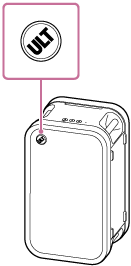
Press the ULT button on the speaker.
Each time you press the ULT button on the speaker, the setting switches among ULT1, ULT2, and FLAT.
Each time the setting is changed, you hear the notification sound from the speaker. At the same time, the ULT button on the speaker lights up or goes out.

ULT1 is a setting that emphasizes deep bass sound.
ULT2 is a setting that emphasizes the sense of power.
FLAT is a setting that keeps sound true to the original sound.
Hint
-
By using the “Sound Connect” app, you can do the following:
-
Selecting the sound effects
-
Enabling or disabling the notification sound to play when you press the ULT button
-
Selecting the sound mode to switch to when you press the ULT button
-
Note
-
The STAMINA power option is disabled when the sound effects are enabled. The sound effects include ULT1 and ULT2.