


Parts and controls
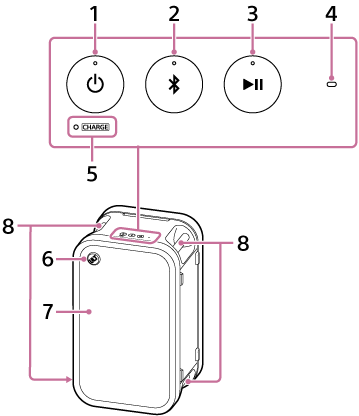
-
 power button with indicator
 -
 BLUETOOTH button with indicator
 -
 playback button
There is a tactile dot on the playback button on the speaker. Use this dot as a guide to work with the button.
-
Microphone sensing hole
Do not place any object on this hole.
-
CHARGE indicator
-
ULT button with volume dial
When you press and hold the ULT button on the speaker for about 2 seconds, the speaker plays a particular music track. This music track is stored for demonstration purposes. To disable this feature, press the ULT button once again for about 2 seconds or press the playback button.
-
Light
-
Handles
-
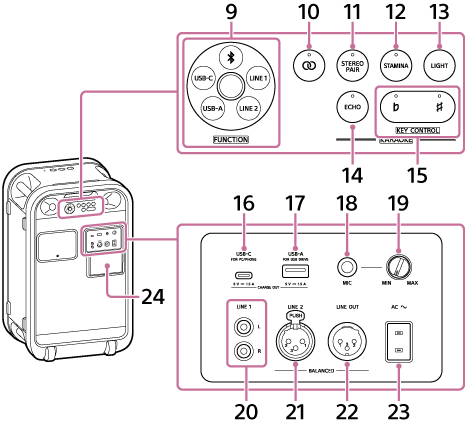
FUNCTION dial
-
BLUETOOTH
-
LINE 1
-
LINE 2
-
USB-A
-
USB-C
-
-
 Party Chain button with indicator
 -
STEREO PAIR button with indicator
-
STAMINA button with indicator
-
LIGHT button
-
ECHO button with indicator
-
KEY CONTROL buttons and indicators
 flat button with indicator
 sharp button with indicator
 -
USB-C port (USB Type-C®)
You can play music from your computer or smartphone. This port is also capable of supplying power to another device.
-
USB-A port
You can play music from your USB device. This port is also capable of supplying power to another device.
-
MIC jack (Φ 6.3 mm)
-
MIC level knob
The microphone volume is minimized when this knob on the speaker is turned to MIN.
The microphone volume is maximized when this knob on the speaker is turned to MAX.
-
LINE 1 jack
Connect a commercially available RCA cable to the LINE 1 jack on the speaker.
-
LINE 2 jack
Connect a commercially available XLR cable to the LINE 2 jack on the speaker.
-
LINE OUT jack
Connect this jack and the LINE 2 jack on another speaker with a commercially available XLR cable.
-
AC input jack
-
Cap
Note
-
The ports and jacks on the speaker are not designed to be water resistant. Do not use the speaker in places where water may splash on the speaker. When you are finished with using the speaker, be sure to securely close the cap.