


Customization features of the camera
The camera has various customization features such as registration of functions and shooting settings to custom keys. You can combine your preferred settings to customize the camera for easier operation.
For details on how to configure the settings and use them, refer to the page for each function.
Recalling frequently used functions quickly
Changing the shooting settings quickly according to the scene
Recalling frequently used functions quickly
 Custom Key/Dial Set. /
 Custom Key/Dial Set. /
 Custom Key Setting
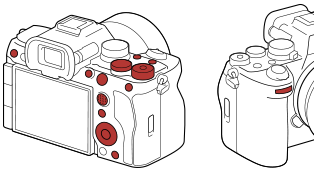
You can change the functions of the buttons including the Custom Buttons (C1 to C4) according to your preferences.
It is recommended that you assign frequently used functions to easily operable buttons so that you can call up the assigned functions simply by pressing the corresponding button.
Assignable buttons
For details, refer to “ Assigning frequently used functions to buttons and dials (Custom Key/Dial Set.) .”
Function menu
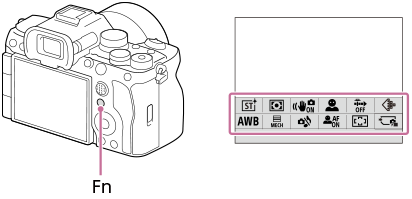
If you register functions frequently used in the shooting mode or in the playback mode to the Function menu, you can display the registered functions on the screen simply by pressing the Fn (Function) button. On the Function menu screen, you can recall the function you want to use by selecting the icons.
The position of the Fn (Function) button and an example of the function menu
 My Menu
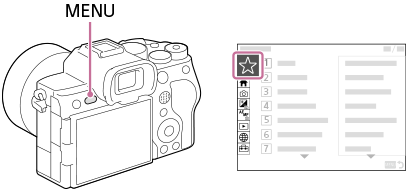
If you combine the frequently used items from menus such as the shooting and network menu on the “My Menu” screen, you can quickly access the desired menu items.
For details on how to create the “My Menu” screen, refer to “Add Item.”
- To display the “My Menu” screen just by pressing the MENU button, set MENU → (My Menu) → [My Menu Setting] → [Display From My Menu] to [On].
Changing the shooting settings quickly according to the scene
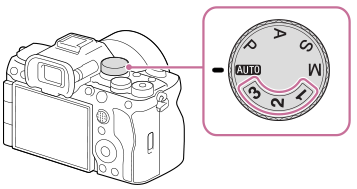
 Camera Set. Memory
You can register the appropriate shooting settings* for scene to the camera or a memory card, and call up the settings easily by using the mode dial, etc.
* You cannot register custom key settings.
Other customization features
In addition to the above, you can further customize operability with the following features.
Reg. Custom Shoot Set
You can register shooting settings to buttons in advance and recall them temporarily while the button is pressed.
The setting can be changed instantly, and the original setting is restored when the button is released. This is convenient when shooting scenes where conditions change easily.
 My Dial Settings
You can assign the desired functions to the front dial, rear dial L, rear dial R, and control wheel and register up to three combinations of settings to the camera as the “My Dial 1 - 3” settings.
Save/Load Settings
You can save camera settings* to a memory card using [Save/Load Settings]. This function is useful when you want to back up the settings, or to import the settings to another camera of the same model, etc.
* Some settings cannot be saved on a memory card.