


Main menu (shooting setting list)
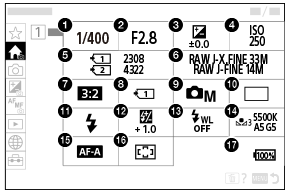
Select the  (Main) tab on the menu screen to display a list of shooting settings. You can confirm the settings before shooting or for each scene, and also change the settings directly from this screen.
Main menu for shooting still images
Main 1
-
Shutter Speed *
-
Aperture *
-
 Exposure Comp.
-
ISO
-
Number of recordable images
-
Image Quality Settings
-
Aspect Ratio
-
Rec. Media Settings
-
Shoot Mode
-
Drive Mode
-
Flash Mode
-
Flash Comp.
-
Wireless Flash
-
White Balance
-
Focus Mode
-
Focus Area
- Remaining battery level
* When the shooting mode is [Program Auto], the shutter speed and aperture value are displayed in the same area. You can perform Program Shift by selecting the area.
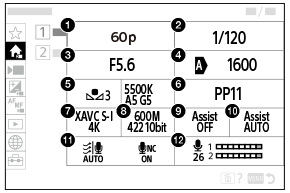
Main menu for shooting movies
Main 1
-
Rec Frame Rate/
 Frame Rate Settings (when shooting slow-motion/quick-motion movies)/
 Frame Rate Settings (when shooting time-lapse)
 -
Shutter Speed
-
Aperture
-
ISO
-
White Balance
-
Picture Profile
-
 File Format
-
Record Setting/
Record Setting (when shooting slow-motion/quick-motion movies)/
Record Setting (when shooting time-lapse) -
Gamma Display Assist
-
Gamma Disp. Assist Typ.
-
Audio NR Settings
-
Audio Rec Level
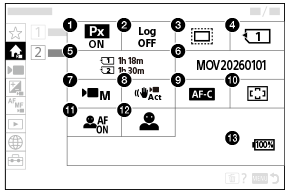
Main 2
-
 Proxy Recording
-
Log Shooting Setting
-
 Shooting
-
Recording Media
-
Available recording time
-
File Settings
-
Shoot Mode
-
 Shoe Audio Format
*
Shoe Audio Format
*
-
Shoe Audio Ch No.
*
-
32bit float WAV Rec. *
-
Focus Mode
-
Focus Area
-
Subject Recog in AF
-
Recognition Target
-
SteadyShot
-
Remaining battery level
*When the camera’s system software (firmware) version is Ver.2.00 or later
Hint
- If you assign the [Display Main Menu] function to the desired key using the custom key settings, you can also open the Main menu by pressing the assigned key.
- You can open the setting screens by touching the icons on the main menu when [Touch Operation] is set to [On] and [Menu Screen] under [Touch Panel Settings] is set to [On].
- Touch the item for number of recordable images/available recording time on the main menu to open the [Format] screen.