


Sides
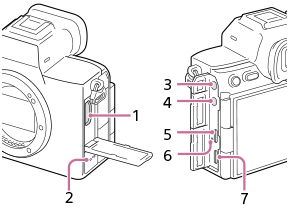
- HDMI type A jack
- Speaker
-
 (Microphone) jack
When an external microphone is connected, the built-in microphone turns off automatically. When the external microphone is a plugin-power type, the power of the microphone is supplied by the camera.
-
 (Headphones) jack
 - USB Type-C® terminal (USB PORT 1)
- Charge lamp
- USB Type-C terminal (USB PORT 2)
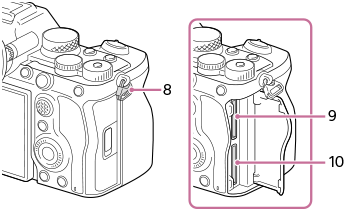
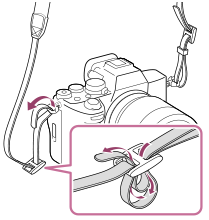
- Hooks for shoulder strap
Attach both ends of the strap onto the camera.
- SLOT 1 (Memory card slot 1)
- SLOT 2 (Memory card slot 2)
Notes on USB terminals
- Only the USB Type-C terminal of USB PORT 1 supports SuperSpeed USB 10 Gbps (USB 3.2). It is recommended to use USB PORT 1 when connecting the camera to a device such as a computer.
You can also connect the camera to a device such as a computer using USB PORT 2, but USB communication will be Hi-Speed USB 480 Mbps (USB 2.0) communication. - You can use either of the USB Type-C terminals, USB PORT 1 or USB PORT 2, for power supply or charging. The charging time is the same regardless of which terminal you use.
- USB communication and power supply can be performed simultaneously by using two USB Type-C terminals. In this case, use USB PORT 1 for USB communication and USB PORT 2 for power supply.
Notes on the terminal cover
Ensure that the terminal cover is closed before use.
TP1002161090