


DISP (Screen Display) (still image)

Allows you to set the screen display modes that can be selected using DISP (Display Setting) when shooting still images.
- MENU →
 (Setup) → [Operation Customize] → [
 DISP (Screen Display)] → [Monitor] or [Finder] → desired setting → [Enter].The items marked with
 (check) are available.
Menu item details
- Display All Info.:
- Shows recording information.
- No Disp. Info.:
- Does not show recording information.
- Histogram:
- Displays the luminance distribution graphically.
- Level:
- Indicates whether the product is level in both the front-back (A) and horizontal (B) directions. When the product is level in either direction, the indicator turns to green. (The level does not work when the lens is facing right up or right down.)
-
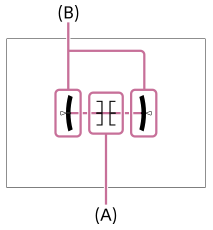
- Histogram&Level:
- Displays the histogram and the level gauge.
- For viewfinder *1:
- Displays only shooting information on the monitor, not the subject. This setting is a display setting for shooting with the viewfinder.
- Monitor Off *1:
- Always turns the monitor off when shooting images. You can use the monitor when playing back images or operating MENU. This setting is a display setting for shooting with the viewfinder.
- Custom 1/Custom 2/Custom 3 *2:
- You can customize the shooting information displayed in the viewfinder.
*1 These screen modes are available only in the setting for [Monitor].
*2 These screen modes are available only in the setting for [Finder].
To hide exposure information after a certain period of time
You can set whether to always display exposure information ([Exposure: On]) or to hide exposure information after a certain period of time has elapsed from the last operation of the shutter button, etc. ([Exposure: TimeOut]) for the following screen displays.
- No Disp. Info.
- Histogram (only when setting for [Finder])
- Level (only when setting for [Finder])
- Histogram&Level (only when setting for [Finder])
To customize the shooting information displayed in the viewfinder
By using [Custom 1]/[Custom 2]/[Custom 3], you can customize the display for the viewfinder.
Select  (Edit) and then customize the shooting information display to your preferences.
- Exposure: On:
- Always displays exposure information.
- Exposure: TimeOut:
- Hides information such as the exposure value after a certain period of time has elapsed from the last operation of the shutter button, etc. when shooting images during vertical display.
- Histogram:
- Displays the histogram.
- Level:
- Displays the level gauge.
- Footer Custom:
- You can customize the shooting information displayed in the footer. Up to 5 desired items of shooting information can be displayed in the footer.
- Select
 (Edit) and then set the desired items and their positions.
- Select
Note
- If you tilt the product forward or backward by a large degree, the level error will be great.
- The product may have a margin of error of almost ±1° even when the inclination is corrected by the level.
TP1002161100