


Minimizing noise with the LOW CUT function
Minimize unwanted noises, such as wind noise, air-conditioning noise, and vibration noise, by attenuating low-frequency components of the input audio from the INPUT1, INPUT2 or INPUT3 jack.
- Change the LOW CUT (INPUT1/INPUT2/INPUT3) switch setting.
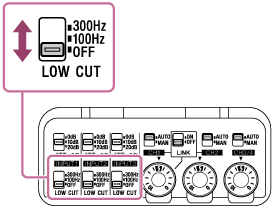
Select either “300Hz” or “100Hz” depending on the noise to minimize.
Note
-
Each LOW CUT switch (for INPUT1 and INPUT2) is enabled only when its respective INPUT switch, INPUT1 (LINE/MIC/MIC+48V) or INPUT2 (LINE/MIC/MIC+48V), is set to “MIC” or “MIC+48V.”