


Using this unit as a computer audio interface
By connecting this unit to a computer that supports USB audio input, you can use the unit as a computer audio interface.
Note
-
When connected to the computer, this unit operates using USB power supplied from the computer.
If the unit is attached to the camera, be sure to remove it from the camera before connecting it to the computer.
-
For computer operations, refer to the operating instructions of the computer.
-
For audio recording with this unit and the connected computer, your computer must be compatible with USB Audio Class 2.0.
-
When connecting this unit to the computer, be sure to check the port type on your computer and use a compatible cable.
For a USB Type-C cable, use one that supports data transfer.
-
The microphone shown in the illustration is not supplied.
- Attach this unit to the supplied mini-stand.
For details, see “Using the supplied mini-stand.”
- Use a USB Type-C cable (commercially available) to connect the USB Type-C port on this unit to the USB port on the computer.
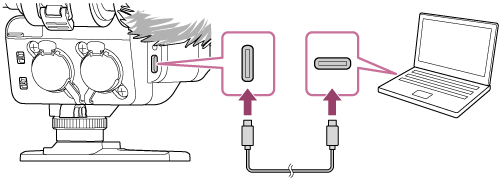
- Make sure that this unit is recognized correctly and configure the audio settings on the computer.
-
When connecting this unit to the computer, recording is limited to a maximum of 24 bit/96 kHz/2-channel.
-
When connecting this unit to the computer, the following switch and dial settings are disabled.
-
DIGITAL/ANALOG switch
This unit outputs digital signals regardless of the switch selection: “DIGITAL” or “ANALOG.”
-
INPUT SELECT (CH3/CH4) switch
-
AUTO/MAN (CH3/4) switch
-
AUDIO LEVEL (CH3/4) dial
-
-
Note
-
Do not apply excessive force to this unit when you connect the unit to a computer. This may cause damage to the unit or the computer.
-
Connecting this unit to a laptop computer that is not connected to an AC power source may deplete the battery power of the computer. Do not leave the unit connected to the computer for an extended period of time.
-
Use of any customized or hand-built computer is not guaranteed. Depending on the USB devices used simultaneously, this unit may not operate correctly.
-
Not all the computers are guaranteed for operation with this unit.
-
When connecting this unit to a computer, be sure to use only the USB Type-C cable and connect them directly. The unit will fail to operate correctly when connected indirectly, for example, via a USB hub.
-
While audio recording is in progress, operating the switches or dials on this unit may cause operation sounds to be included in the recording. Before changing the switch/dial settings, be sure to stop the recording.