


Attaching this unit to the camera using the supplied Shoe Audio Extension Cable
Attach this unit to the camera using the supplied Shoe Audio Extension Cable.
It is convenient, for example, when recording with a microphone (not supplied) attached to the unit from a distance.
Note
-
Before attaching/removing the Shoe Audio Extension Cable to/from the camera, turn off the power to the camera.
-
The Shoe Audio Extension Cable can be used with audio accessories for devices equipped with the Multi Interface Shoe. It is not compatible with external flashes.
For camera models compatible with the Shoe Audio Extension Cable, visit the website at:
-
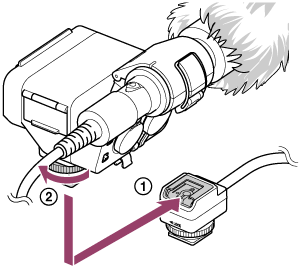
The microphone shown in the illustration is not supplied.
- Remove the connector protect caps from this unit and the Shoe Audio Extension Cable.
- Slide the Multi Interface foot of this unit into the shoe of the Shoe Audio Extension Cable (
 ), and then rotate the lock dial in the “LOCK” direction to firmly secure the unit (
 ).
).
When it is difficult to insert the Multi Interface foot into the shoe, rotate the lock dial counterclockwise until it stops, and then try again.
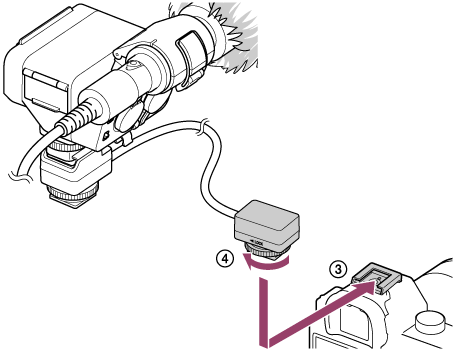
- Slide the Multi Interface foot of the Shoe Audio Extension Cable into the shoe on the camera (
 ), and then rotate the lock dial in the “LOCK” direction to firmly secure the Shoe Audio Extension Cable (
 ).
).
When it is difficult to insert the Multi Interface foot into the shoe, rotate the lock dial counterclockwise until it stops, and then try again.
To use the supplied shoe audio extension cable reinforcement attachment
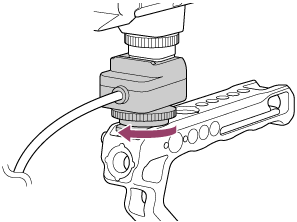
When attaching this unit to a camera rig or similar equipment, use the shoe audio extension cable reinforcement attachment.
-
Attach the Shoe Audio Extension Cable to a camera rig or similar equipment, and then rotate the lock dial in the “LOCK” direction to firmly secure the Shoe Audio Extension Cable.
-
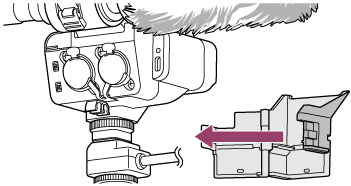
Attach the shoe audio extension cable reinforcement attachment so that it matches the shape of this unit and the Shoe Audio Extension Cable.
-
Align the hole (
) on the shoe audio extension cable reinforcement attachment with the protrusion (), and push it in until it clicks into place to secure it.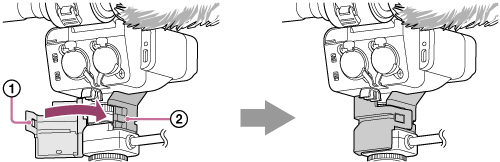
Note
-
When using the built-in flash of the camera, remove this unit from the camera.
-
When you do not intend to use this unit or the Shoe Audio Extension Cable, be sure to attach the connector protect cap back to the Multi Interface foot.
-
When attaching the shoe audio extension cable reinforcement attachment, be careful not to pinch your fingers.
-
When attaching the Shoe Audio Extension Cable to a camera rig, if the cable is longer than needed, secure the excess, for example, by wrapping it around the camera rig, so that it does not appear in the lens.