


Using the supplied mini-stand
Use the mini-stand when connecting this unit to a computer.
Note
-
The microphone shown in the illustration is not supplied.
To attach the mini-stand
- Remove the connector protect cap from this unit.
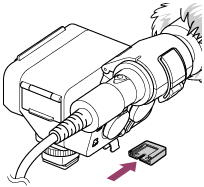
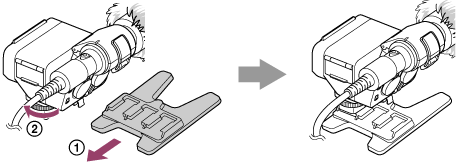
- Slide the mini-stand into Multi Interface foot of this unit (
 ), and then rotate the lock dial in the “LOCK” direction to firmly secure the unit (
 ).
).
To remove the mini-stand
Rotate the lock dial counterclockwise until it stops, and then slide the mini-stand in the opposite direction from attachment.
Hint
-
The mini-stand has 3 mounting positions. Attach this unit to the position that allows for balanced mounting according to your microphone (not supplied).
-
Depending on the combination of your microphone and this unit, the mini-stand may not be able to support them. In such a case, secure the microphone separately.
Note
-
When you do not intend to use this unit, be sure to attach the connector protect cap back to the Multi Interface foot.