


Attaching this unit directly to the camera/removing it
Attach this unit directly to the camera.
Note
-
Before attaching/removing this unit to/from the camera, turn off the power to the camera.
-
The microphone shown in the illustration is not supplied.
- Remove the connector protect cap from this unit.
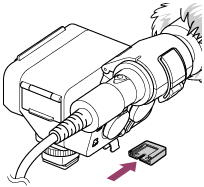
- Slide the Multi Interface foot of this unit into the shoe on the camera (
 ), and then rotate the lock dial in the “LOCK” direction to firmly secure the unit (
 ).
).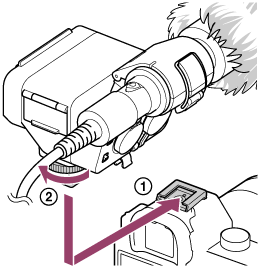
When it is difficult to insert the Multi Interface foot into the shoe, rotate the lock dial counterclockwise until it stops, and then try again.
To remove this unit
Turn off the power to the camera, rotate the lock dial counterclockwise until it stops, and then slide out the Multi Interface foot from the shoe.
Note
-
When using the built-in flash of the camera, remove this unit from the camera.
-
When you do not intend to use this unit, be sure to attach the connector protect cap back to the Multi Interface foot.