


Selecting the input audio for output to each channel on the camera or computer
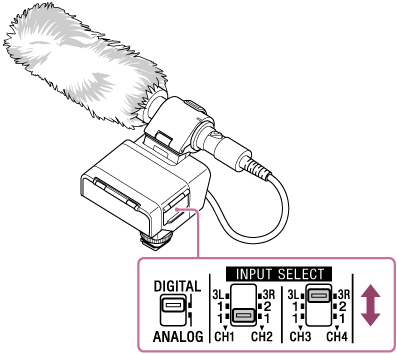
You can select the input audio to be output to each channel on the camera or computer from INPUT1, INPUT2, or INPUT3 by setting the INPUT SELECT switch on this unit.
Note
-
Set the number of channels to use in the camera or computer menu.
-
When connecting this unit to the computer, recording is limited to a maximum of 2-channel.
-
The microphone shown in the illustration is not supplied.
- Change the INPUT SELECT switch setting.
-
When outputting to CH1 and CH2
Set the INPUT SELECT (CH1/CH2) switch accordingly.
Audio input jack INPUT SELECT (CH1/CH2) switch settings Audio output channel INPUT1 only 1/1 CH1: INPUT1
CH2: INPUT1INPUT1 and INPUT2 1/2 CH1: INPUT1
CH2: INPUT2INPUT3 3L/3R CH1: INPUT3L
CH2: INPUT3R-
When outputting to CH3 and CH4
Set the INPUT SELECT (CH3/CH4) switch accordingly.
Audio input jack INPUT SELECT (CH3/CH4) switch settings Audio output channel INPUT1 only 1/1 CH3: INPUT1
CH4: INPUT1INPUT1 and INPUT2 1/2 CH3: INPUT1
CH4: INPUT2INPUT3 3L/3R CH3: INPUT3L
CH4: INPUT3RFor detailed examples of specific connections and settings, see “About input and channel settings.”
-