


Displaying the aibo menu
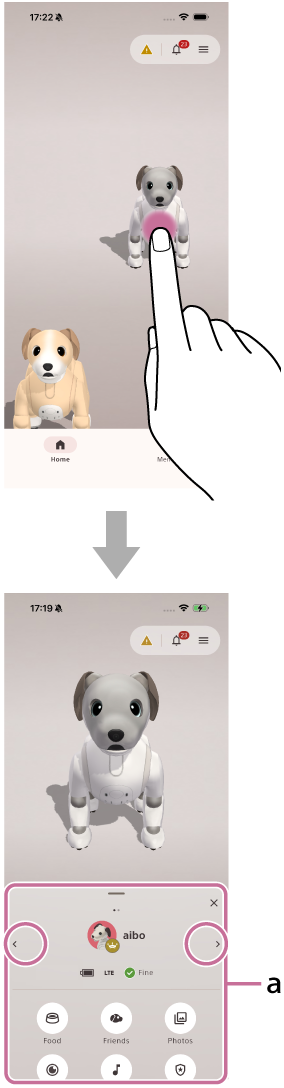
- Tap aibo on the home screen.
Part (a) of the aibo menu is displayed at the bottom of the screen.
If multiple aibo products are registered, tap the left or right arrow icon to switch the displayed aibo.
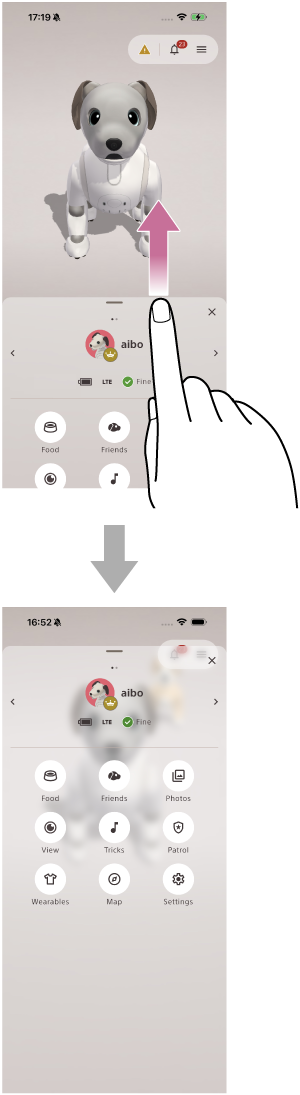
- Swipe up on the aibo menu area.
The full aibo menu is displayed.
aibo menu
-
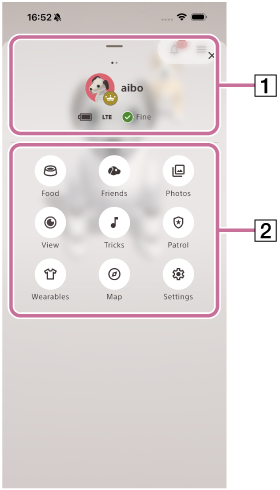
aibo profile
You can view information such as the battery level and network connection status of your registered aibo.
-
aibo menu
-
Food: You can enjoy digital food together with your aibo.
-
Friends: You can connect and interact with other aibo.
-
Photos: You can view photos taken by your aibo.
-
View: You can view live video from your aibo.
-
Tricks: You can view the tricks your aibo has learned and ask aibo to perform them instantly.
-
Patrol: You can have your aibo patrol your home.
-
Wearables: You can customize your aibo's fashion with digital collars, headwear, and outfits.
-
Map: You can view a map of the room created by your aibo.
-
Settings: You can check various settings such as Wi-Fi, system update status, and subscription information.
-
