


Connecting to a paired computer (Windows 11)
Before starting the operating procedure, check the following.
- Depending on the computer you are using, the built-in Bluetooth adaptor may need to be turned on. In the following cases, refer to the operating instructions supplied with your computer.
- You do not know how to turn on the Bluetooth adaptor.
- You want to know if your computer has a built-in Bluetooth adaptor.
-
Wake the computer up if the computer is in standby (sleep) or hibernation mode.
-
Remove the headset units from the charging case.
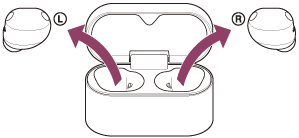
The headset turns on automatically.
-
Put the headset units into your ears.
When the headset has automatically connected to the last connected device, you will hear a notification sound indicating that the connection is established from the headset units.
Check the connection status on the computer. If it is not connected, proceed to step 4.
-
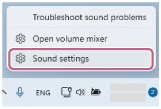
On your computer screen, right-click the speaker icon on the toolbar, then select [Sound settings].
-
On the [Sound] screen, select [WF-1000XM6] for [Output] and [Input].
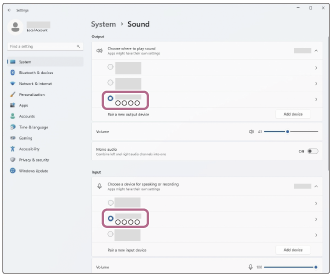
If [WF-1000XM6] is not displayed for [Output] and [Input], proceed to step 6.
-
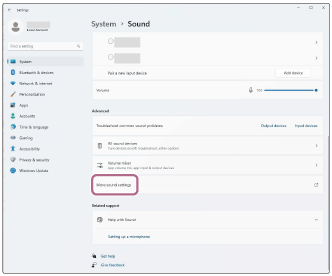
Click [More sound settings].
-
On the [Playback] tab on the [Sound] screen, select [WF-1000XM6] and right-click it. Select [Connect] from the displayed menu.
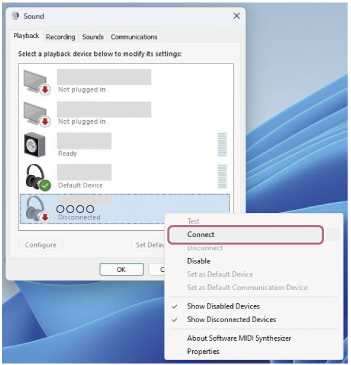
You will hear a notification sound indicating that the connection is established from the headset.
-
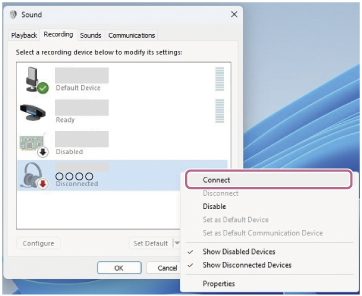
On the [Recording] tab, select [WF-1000XM6], right-click it, and select [Connect] from the displayed menu.
Hint
- The above operating procedure is an example. For more details, refer to the operating instructions supplied with the computer.
Note
- If the music playback sound quality is poor, check that the A2DP function which supports music playback connections is enabled in the computer settings. For more details, refer to the operating instructions supplied with the computer.
-
If the last connected Bluetooth device is placed near the headset, the headset may automatically connect to the device when you turn on the headset and may not connect to another device.
If this occurs, cancel the Bluetooth connection on the last connected device. - If you cannot connect your computer to the headset, delete the headset pairing information on your computer. Then, pair them again. For the operating procedures on your computer, refer to the operating instructions supplied with the computer.
TP1002095493