Maintenance
Perform regular maintenance by following the procedures below.
-
Remove the earbud tip.
Hold the headset unit and twist the earbud tip while rotating it to pull it out.
Do not pinch the end of the earbud tip when removing it.

-
Clean the headset.
Cleaning the headset units
Dust and dirt on the exterior of the headset can be wiped off with pure water type wet wipes. Do not use wet wipes such as those containing alcohol, thinner, or benzene as they may damage the finish on the surface of the headset or cause other damages.
Use a soft dry cloth to wipe off any water that gets on the headset units.
Do not allow the headset to remain with water droplets attached in a cold environment as the water may freeze.
Cleaning the IR sensors
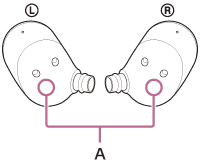
If the IR sensors (A) are dirty, wearing of the headset may not be detected and the headset may not work properly.
Wipe off any dirt on the IR sensors (A) with a soft dry cloth, etc.
Cleaning the charging ports
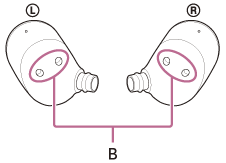
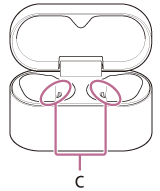
If foreign matter or moisture, such as sweat, is left on the charging ports (B) of the headset or the charging ports (C) of the charging case, charging port corrosion may occur and prevent charging.
When you have finished using the headset, make sure to gently clean the charging ports with a soft dry cloth or cotton swab.
When the headset cannot be charged, it may help to try thoroughly cleaning the charging ports.
Charging ports that need maintenance
-
Headset
-
Charging case
Note
- Do not use an air duster or similar products to remove dust or debris.
Dust and other debris may enter the sound output holes and cause malfunction.
Cleaning of the sound output holes
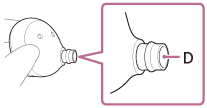
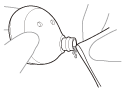
Wipe off any dirt, including earwax, in the sound output hole (D) of the headset unit using a tightly wrung out water moistened cloth.
Remove the dirt so that it does not push into the headset unit deeply.
Cleaning the vent parts
Wipe off any dirt, including earwax, in the vent hole (E) of the headset unit using a tightly wrung out water moistened cloth.
Remove the dirt so that it does not push into the headset unit deeply.
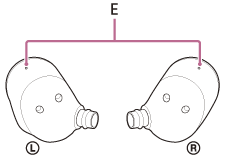
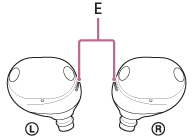
If dirt is already lodged in the vent output hole (E) and cannot be removed using the above methods, use a clean, soft brush. When using a brush, gently sweep the surface to remove dirt.
Note
- To prevent damage to internal components, do not insert the brush deeply into the hole.
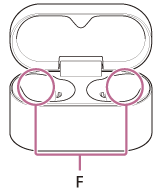
Cleaning the holes of the charging case
Clean the holes (F) where the earbud tips fit with a cotton swab, etc.
Drying the headset
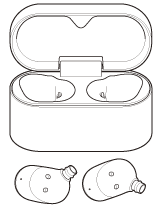
After cleaning is complete, leave the headset to dry thoroughly at room temperature.
Note
- When drying the headset, if the IR sensors touch the table, the headset will be considered worn and the rechargeable battery may continue to be consumed. Place the headset units with the IR sensors facing sideways or upwards.
Cleaning the noise isolation earbud tips
When the noise isolation earbud tips become dirty, wipe off the dirt with a dry cloth, etc.
If earwax or other foreign matter gets on the mesh part of the earbud tips, the sound may sound low or difficult to hear.
Remove the earbud tip from the headset, apply a cotton swab lightly to the mesh part, and rotate the cotton swab slowly to wipe off the dirt. Be careful not to tear the mesh part.

Note
- Earbud tips are consumables.
- When the earbud tips get soaked, drain the liquid well, and make sure that the earbud tips are dried before use or storage.
- Avoid washing with water, using wet tissues, or using organic solvents such as alcohol, as these can cause premature deterioration.

- Rubbing with paper, using sharp metal objects, nails, or adhesive tape may damage or deform the earbud tips.
- Do not pull on the polyurethane foam portion of the earbud tip. If it is separated from the earbud tip, it will not function.
- Do not subject the polyurethane foam portion of the earbud tip to pressure for over long periods of time. It may cause deformation and it may be difficult to return the earbud tip to the original shape.
- The foam materials may become firm at a low temperature. Warm the earbud tips a little with your hands before use.
- When the environmental temperature or usage temperature is high, the polyurethane foam may take time to return to its original shape.
-
-
Attach the earbud tip.
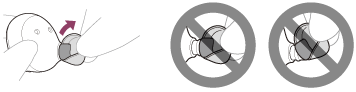
Push the earbud tip firmly onto the headset's sound conduit (sound output tube) until it is properly seated. Do not attach the earbud tip in a loose or skewed manner.

If the earbud tip is not firmly attached, it may fall off, and the sound quality, noise canceling, and wearability may become impaired.
-
Check that the earbud tip is securely attached.
Twist the earbud tip to one side and check that the stem of the earbud tip is completely covering the sound conduit on the headset unit.
-
Set the headset in the charging case.
After maintenance as well as after cleaning and drying the headset, be sure to set the headset units in the charging case.
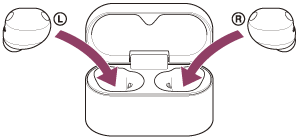
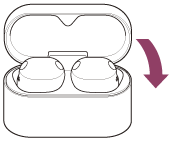
Be sure to close the charging case lid.