


Using Google Gemini
May not be supported in some countries and regions.
By linking your device with the Google Gemini app on your smartphone, you can chat with Gemini using your headset. You can get help with questions or tasks hands-free.
-
Open the “Sound Connect” app and set the function of the touch sensor as Digital assistant.
When using Google Gemini for the first time, check if you set the Google Gemini app as the default assist app on your device. And you choose Gemini as your AI assistant.
-
Launch Google Gemini using the following methods.
- To activate Gemini, say "Hey Google"
- Operate the touch sensor on the side assigned for Digital assistant
- Hold your finger to the touch sensor to input a voice command, and release your finger to finish the voice command.
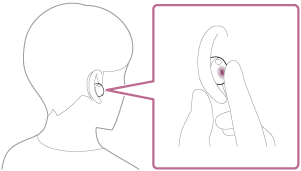
- Hold your finger to the touch sensor to input a voice command, and release your finger to finish the voice command.
Check responses. Setup required. Compatibility and availability varies.
For details, refer to the following website.
https://support.google.com/gemini/answer/15456140
Compatible smartphones
Android 13 or later
For more information about Google Gemini, refer to the following.
- The operating instructions or support website for Android smartphones
- The Google Play Store website
https://support.google.com/gemini/
Hint
- Check or update the software version of the headset with the “Sound Connect” app.
- When Google Gemini is not available for reasons such as not being connected to a device and connected to the network, you will hear a voice guidance indicating unavailability from both units of the headset. When you are wearing only one unit of the headset, you will hear the voice guidance indicating unavailability from the headset unit you are wearing. Notifications may be displayed on the screen of the connected device, but service specifications may change without notice due to changes made by service providers.
Note
- Google Gemini and the voice assist function (Google app) cannot be assigned to the headset at the same time.
- Google Gemini and the voice assist function (Siri) cannot be assigned to the headset at the same time.
- The function to operate the headset with Google Gemini depends on the specifications of Google Gemini.
- The specifications of Google Gemini are subject to change without notice.
- For details on the services provided by other companies such as Google Gemini, consult each service provider directly.
Sony shall assume no responsibility for any problems such as misunderstandings related to the services provided by other companies. - Check responses. Setup required. Compatibility and availability varies.
TP1002090562