


Using Tencent Xiaowei
This feature is available for models designed for the Chinese mainland.
By using Tencent Xiaowei that comes with the smartphone, you can speak to the headset’s microphone to operate the smartphone or perform a search.
Compatible smartphones
- A smartphone with Android 6.0 or later, or iOS 10 or later installed.
- The latest version of the Tencent Xiaowei app is required.
-
Open the “Sound Connect” app and set the function of the touch sensor on either the left or right unit as Tencent Xiaowei.
-
Launch the Tencent Xiaowei app.
-
Operate the touch sensor to which you assigned Tencent Xiaowei to use the Tencent Xiaowei app.
-
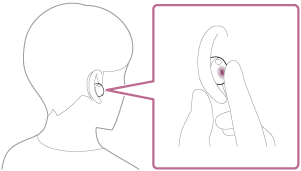
Hold your finger to the touch sensor to input a voice command, and release your finger to finish the voice command.
-
Hold your finger to the touch sensor to input a voice command, and release your finger to finish the voice command.
For details on Tencent Xiaowei, refer to the following website.
https://xiaowei.tencent.com/guide/index.html?cid=1465
Hint
- You can use Tencent Xiaowei when you are wearing only one unit to which Tencent Xiaowei is assigned on your ear. When Tencent Xiaowei is assigned to the headset and you are using only one headset unit, use the headset unit with Tencent Xiaowei assigned. Check the setting of the headset with the “Sound Connect” app.
- Check or update the software version of the headset with the “Sound Connect” app.
- When Tencent Xiaowei is not available for reasons such as not being connected to the network, you will hear a voice guidance indicating unavailability from both units of the headset. When you are wearing only one unit of the headset, you will hear the voice guidance indicating unavailability from the headset unit you are wearing. Notifications may be displayed on the screen of the connected device, but service specifications may change without notice due to changes made by service providers.
Note
-
Tencent Xiaowei can be assigned to the headset unit with the touch sensor that has the music playback function assigned. When you want to use Tencent Xiaowei on either headset unit, assign the music playback function to the headset unit you want to use, and then assign Tencent Xiaowei.
On the headset unit to which the music playback function is not assigned, Tencent Xiaowei cannot be used.
You can change the function assignments to the touch sensors of the left and right headset units using the “Sound Connect” app. - Tencent Xiaowei and the voice assist function cannot be assigned to the headset at the same time.
- Tencent Xiaowei is only available in China.
TP1002090546