


Disconnecting Bluetooth connection (after use)
-
Disconnect the Bluetooth connection by operating the Bluetooth device.
When you are wearing both headset units, you will hear a notification sound from both headset units at the same time. When you are wearing only one headset unit, you will hear the notification sound from the headset unit you are wearing.
-
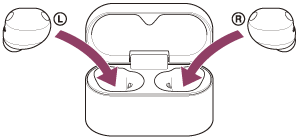
Set the headset units into the charging case, and close the charging case lid.
Put the left-side headset unit back into the left hole of the charging case. Put the right-side headset unit back into the right hole of the charging case. There is a tactile dot on the left-side headset unit. Each headset unit will be set to the correct position in the charging case by the built-in magnet.
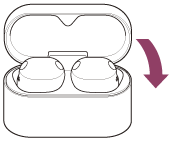
The headset turns off.
Hint
- When you finish playing music, the Bluetooth connection may terminate automatically depending on the Bluetooth device.
TP1002088417