


Location and function of parts
Wireless Gaming Mouse
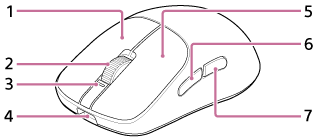

-
R Button
-
Scroll Wheel
-
Status indicator (white/orange)(*)
-
USB Type-C port
Connect the mouse to a computer with the supplied USB Type-C cable to charge the mouse or use it as a wired mouse. You can also charge the mouse by connecting to an AC outlet via a commercially available USB AC adaptor.
-
L Button
-
Mouse Button 5
-
Mouse Button 4
-
High sensitive sensor
-
Power button (long press)/Profile switching button (short press)
-
Mouse feet
-
Serial number
It is listed on the bottom of the mouse.
(*) You can use “INZONE Hub” to set the lighting color.
Wireless dongle
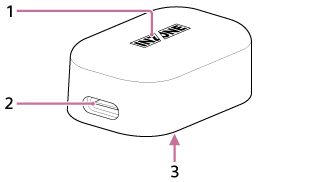
-
Status indicator (white)
-
USB Type-C port
Connect to a computer with the supplied USB Type-C cable.
-
Serial number
It is listed on the bottom of the wireless dongle.