


Precautions
About charging
- Be sure to use the supplied USB Type-C cable.
- Check that the USB Type-C cable is firmly connected to the mouse.
- After charging is complete, disconnect the USB Type-C cable.
- When the USB Type-C cable is connected, do not apply excessive force to the connection part.
- When connecting or disconnecting the USB Type-C cable, do not apply excessive force, such as by pulling the cable, and connect or disconnect the connector straight to the port.
- If the USB Type-C cable connector is deformed, such as it being bent, stop use immediately.
On using the mouse while charging
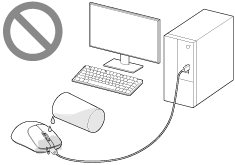
- Charging when there is liquid such as water or sweat or foreign matter such as dust on the USB Type-C cable or USB Type-C port on the mouse can cause accidents such as burns or serious injuries due to fire, electric shock, overheating, or ignition, or can be the cause of a malfunction. Note the following when you use the mouse while charging.
- If you feel any abnormality, stop using it immediately.
- Check that there is no dust or foreign matter inside.
- If the USB Type-C cable or port gets wet due to liquid such as drinking water or sweat while charging, disconnect the USB Type-C cable from the connected device immediately to stop charging.
Other notes
- When using the mouse, try to keep it as close to the wireless dongle as possible.
- Refrain from prolonged use as it may be harmful for your health.
- When connecting or disconnecting the cable, always hold the plug, not the cable. Pulling on the cable part may break the cable.
- Firmly insert the plug all the way into the port. If the plug is not firmly inserted, the mouse may not work properly.
- The mouse is a precision device. Do not drop, bump, or otherwise subject the mouse to excessive shock.
- Wipe the plug occasionally with a dry, soft cloth.
- Wipe the exterior clean with a dry, soft cloth.
- For stubborn stains, moisten a soft cloth with warm water and then wipe.
- Do not use detergents, alcohol, or similar agents. They may cause discoloration or deterioration.
- To remove dust, use a soft brush or a similar item and gently wipe clean.
- Do not apply weight or pressure to the mouse for long periods of time. It may cause deformation. When storing the mouse, do not apply force.
- If you experience discomfort while using the mouse, stop using it immediately.
- Avoid leaving the mouse in high temperatures and high humidity, especially in a car with temperatures above 60 °C (140 °F). It may cause heating or ignition.
- The mouse feet parts of the mouse may become damaged or deteriorate from long-term use or storage.
- The supplied USB Type-C cable may become kinked during use, but this is not abnormal.
- If you have any other questions or problems, consult Sony support contact or your nearest Sony dealer.