


Initializing the mouse to restore factory settings
If the mouse does not operate correctly even after resetting, initialize the mouse.
-
Press the power button (A) for about 2 seconds to turn off the mouse.

If the mouse is connected to a computer with the USB Type-C cable, disconnect the USB Type-C cable.
-
Press the power button (A), R button (B), and L button (C) simultaneously for about 10 seconds.
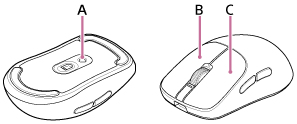
When initializing is complete, the status indicator flashes in white 4 times.

Initialize all mouse settings to factory defaults.
If the mouse does not operate correctly even after initializing, consult the Sony support contact or your nearest Sony dealer.
Note
- Initializing the mouse does not affect the connection to the wireless dongle.