SONY

Wireless Gaming MouseINZONE Mouse-AHelp Guide

Table of Contents
Table of Contents
  • Top
      • Included items
      • Location and function of parts
      • About the indicator
      • Charging
      • Available operating time
      • Turning on and off the mouse
    • Using as a wireless mouse
    • Using as a wired mouse
      • What you can do with “INZONE Hub”
      • Installing “INZONE Hub”
      • How to keep the software up-to-date (for comfortable use of the mouse)
    • Precautions
    • To prevent burning or malfunction due to getting wet
    • Licenses
    • Trademarks
    • Customer support websites
    • What can I do to solve a problem?
      • Unable to turn on the mouse.
      • Charging cannot be performed.
      • Charging time is too long.
      • The duration of the battery is short.
      • Unable to connect to a computer.
      • The mouse cannot be operated.
      • The mouse operation is unstable.
      • A character different from the one set for the key is entered.
      • Resetting the mouse
      • Initializing the mouse to restore factory settings
    • Specifications
閉じる


Model: YY2991

Let’s start using it
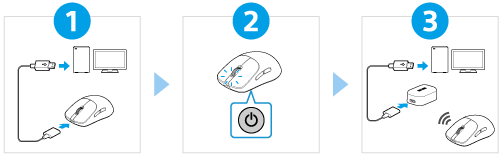
  • Charging the mouse

    Charge the mouse by connecting it to a computer directly with the USB Type-C cable.

    It can also be used as a wired mouse.

  • Turning on the mouse

    Press the power button for about 2 seconds to turn on the mouse.


  • Using as a wireless mouse

    Connect the wireless dongle to a computer with the USB Type-C cable.


To use all functions and improved performances

Update the computer software “INZONE Hub” to the latest version.

For details on “INZONE Hub”, refer to the following URL.

https://www.sony.net/inzonehub-support


MSE-G500

  • Download PDF

Go to Page Top
Language Selection Page
5-067-448-11(1)
Copyright 2025 Sony Corporation